


Your H1 tag is the single most important on-page heading for SEO. It tells both users and search engines what your page is about. Write one unique H1 per page, include your primary keyword near the beginning, keep it between 20–70 characters, make it compelling enough to earn the click, and ensure it matches your page’s search intent. Get this right, and every other heading on the page follows naturally.
Key Takeaways
- The H1 tag is the primary heading of a web page — the most important heading signal for both SEO and user experience.
- Google uses the H1 to understand the core topic of your page, making keyword placement and clarity critical.
- One H1 per page is the recommended best practice — though Google can technically handle multiple, it weakens your topical focus.
- The ideal H1 length is 20–70 characters — long enough to be descriptive, short enough to be clear and scannable.
- H1 and H2 tags work together as a heading hierarchy — H1 states the topic, H2s define the major sections, H3s add depth.
Duplicate H1 tags across multiple pages send conflicting signals to Google and should always be resolved in an SEO audit.
What Is an H1 Tag in SEO?
An H1 tag is an HTML heading element — written as <h1>Your Heading Here</h1> — that marks the primary title of a web page’s content. It is the highest level in the HTML heading hierarchy, sitting above H2, H3, H4, H5, and H6 tags. In SEO, the H1 tag is the most important on-page heading signal: it communicates the page’s core subject to both search engines and human readers.
Unlike the title tag (which appears in the browser tab and search results), the H1 tag appears visibly on the page itself — typically as the large, prominent headline a visitor sees first. While title tags and H1 tags often contain similar or identical text, they serve different technical functions. Both matter. To understand how they fit into the broader picture, what is SEO and how does it work explains the full on-page optimization ecosystem within which H1 tags play a foundational role.
Do H1 Tags Matter for SEO? What Google Actually Says
Yes — H1 tags matter for SEO, but not in the oversimplified ‘put your keyword in the H1 and rank’ way many guides suggest. Their importance is structural, contextual, and user-experience-driven.
Google’s Official Position on H1 Tags
According to Google Search Central’s documentation on headings, heading elements (H1–H6) help Google understand the structure and hierarchy of your content. John Mueller, Google’s Search Advocate, has confirmed that H1 tags give Google ‘a little bit of information about the overall context of a page’ — making them a relevance signal rather than a pure ranking factor.
What this means practically: H1 tags don’t directly boost your position like backlinks do. But they contribute to Google’s understanding of your page’s topic — and when that topic aligns with a user’s search query, your page becomes more eligible to rank for that query. Clarity and relevance in your H1 is what drives this alignment.
How H1 Tags Influence Rankings Indirectly
- Topic clarity: A well-written H1 gives Google unambiguous context about what your page covers, increasing relevance matching accuracy.
- Featured snippet eligibility: Pages with clear H1 headings that match question-based queries are stronger candidates for featured snippets and AI-generated overviews.
- User experience signals: A compelling H1 keeps visitors on-page longer — reducing bounce rate and increasing dwell time, which Google interprets as quality signals.
- Accessibility compliance: Screen readers use H1 as the primary navigation landmark. Pages with proper H1 structure perform better in accessibility audits, which Google increasingly factors into quality assessments.
H1 Tag SEO: The Anatomy of a Perfect H1 Heading
A high-performing H1 tag is not just a keyword container. It is the first line of your value proposition — the sentence that convinces both Google and your visitor that this page answers their question better than any other.
The Five Elements of a Perfect H1 for SEO
- Primary keyword near the front: Place your target keyword in the first half of the H1, ideally within the first three words. ‘H1 Tag SEO: How to Write…’ outperforms ‘How to Write an H1 Tag for Better SEO’ because the keyword appears earlier.
- Descriptive and specific: Vague H1s like ‘Welcome to Our Blog’ or ‘About Our Services’ provide zero topical signal. Be specific: ‘Custom Corporate Catering Services in Dubai’ communicates topic, service, and location in one headline.
- Match search intent: Informational queries need explanatory H1s (‘What Is Schema Markup and How to Add It’). Commercial queries need benefit-focused H1s (‘Professional SEO Services for Dubai Businesses’). The H1 must reflect why users searched.
- Compelling for the reader: SEO value is maximized when users actually stay on and engage with your page. An H1 that promises clear value — a specific answer, a unique benefit, a concrete outcome — reduces bounce rate and improves engagement signals.
- Unique across your site: Every page must have a distinct H1. Duplicate H1 tags across multiple pages are a common SEO error that sends conflicting signals to Google and dilutes your ranking focus for each page’s target keyword.
Recommended Length for H1 Tags in SEO
The ideal H1 length is between 20 and 70 characters. This range balances descriptiveness with scannability.
| Length Range | Character Count | Assessment | Recommendation |
| Too short | Under 15 chars | Not descriptive enough | Avoid — add more context |
| Ideal | 20–70 chars | Clear, keyword-rich, readable | Always aim for this range |
| Borderline | 71–100 chars | May feel cluttered | Only if necessary for clarity |
| Too long | 100+ chars | Diluted and overwhelming | Trim — split into H1 + subheading |
Pro Tip: Differentiate Your H1 From Your Title Tag
Your title tag (shown in Google search results) and your H1 tag (shown on-page) serve different audiences at different moments. The title tag must win the click. The H1 tag must confirm the promise and keep the visitor reading. They can be similar — but make the H1 slightly more detailed or explanatory. For example: Title tag: ‘H1 Tag SEO Guide 2026’ | H1: ‘How to Write a Perfect H1 Tag for SEO: The Complete 2026 Guide’. The H1 reassures the visitor they clicked the right link.
Best Position for Keyword in H1 Tag SEO
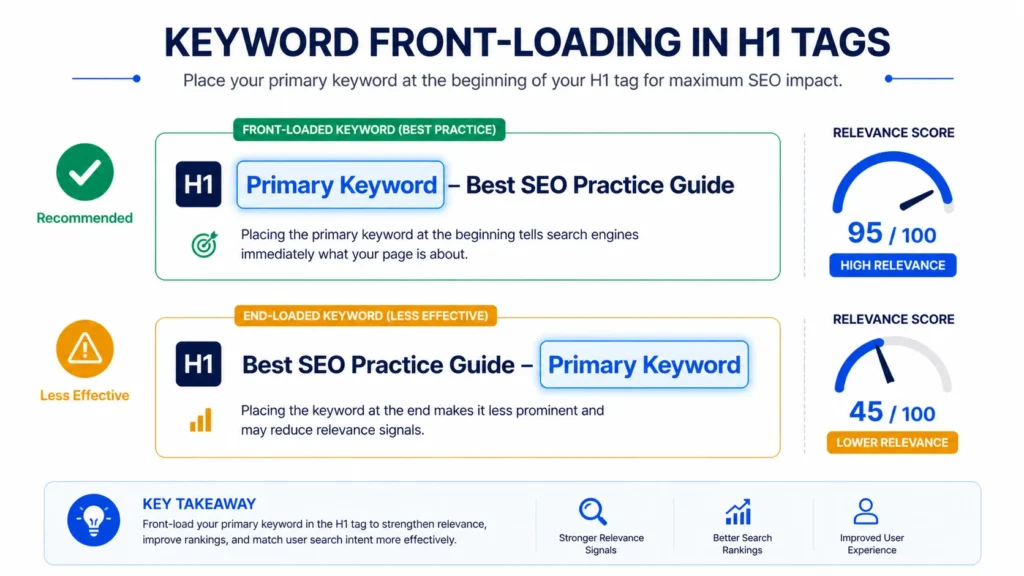
Keyword position within your H1 tag has measurable SEO significance. Search engines — and users — weight the beginning of a heading more heavily than the end. This is called ‘front-loading’ and it’s a consistent best practice across a decade of SEO testing.
Front-Loading vs End-Loading: A Comparison
| Approach | Example H1 | SEO Verdict |
| Front-loaded (best) | H1 Tag SEO: How to Write Perfect Headings | Keyword first — strongest signal |
| Mid-positioned (good) | How to Use H1 Tag SEO for Better Rankings | Acceptable — still keyword-present |
| End-loaded (weak) | Your Complete Guide to Writing H1 Tags for SEO | Keyword buried — weakest signal |
| Keyword absent (avoid) | Your Complete Heading Writing Guide | No signal — missed opportunity |
The difference between these approaches is subtle in individual cases — but across a full site with hundreds of pages, consistent front-loading creates a measurable competitive advantage in keyword relevance matching.
H1 and H2 Tags SEO: Understanding the Full Heading Hierarchy
The H1 tag doesn’t work in isolation. It sits at the top of a heading hierarchy that communicates your content’s structure to both search engines and readers. Understanding how H1, H2, and H3 tags work together is essential for maximizing the SEO value of your headings.
The Heading Hierarchy Explained
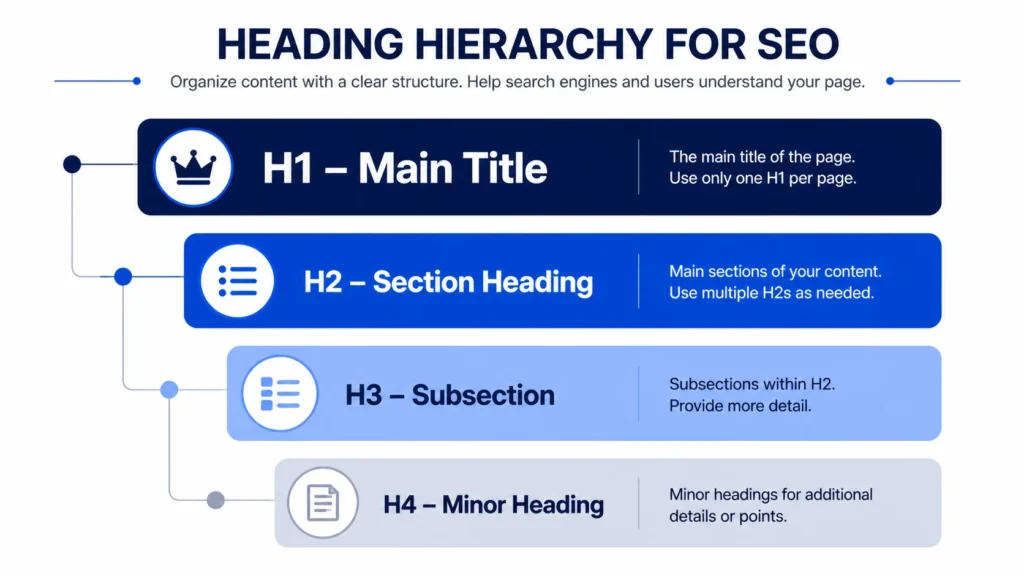
H1 — The Page Title:
One per page. States the primary topic. Contains your main keyword. This is what Google reads to understand the page’s core subject.
H2 — Major Section Headings
Multiple per page. Divides the content into main thematic sections. Each H2 can target a secondary keyword or address a distinct sub-topic of the H1.
H3 — Subsection Headings
Used within H2 sections to break content into specific points, steps, or examples. Can target long-tail keywords and question-based search terms.
H4 — Detail Headings
Used within H3 sections for granular detail, specific items, or technical sub-points. Less common — only use when the content genuinely requires another level of hierarchy.
H1 SEO H2 H3: What Each Level Should Achieve
- H1: Answers ‘what is this page about?’ — primary keyword, page purpose, user promise.
- H2: Answers ‘what will I learn in this section?’ — secondary keywords, section topics, content signposting.
- H3: Answers ‘what specific point is being made here?’ — long-tail terms, question keywords, procedural steps.
- H4: Provides further granularity within an H3 section — technical sub-items, detailed breakdowns, specific examples.
Never skip heading levels for visual effect. Jumping from H1 to H3 without an H2 breaks the logical hierarchy that both users and search engines rely on to understand content structure. Use CSS for visual styling — not heading tags.
This heading hierarchy is one of the core elements covered in a professional on page seo service in dubai — where every page’s heading structure, keyword placement, and content architecture is optimized systematically to maximize both relevance signals and user engagement.
Multiple H1 Tags SEO: Are They Bad? Google’s Guidance Explained
The ‘one H1 per page’ rule is one of the most debated topics in on-page SEO. Here is the definitive answer based on Google’s own statements and real-world evidence.
What Google Says About Multiple H1 Tags
Google’s John Mueller has explicitly stated that having multiple H1 tags on a page is ‘perfectly fine’ from a technical standpoint — HTML5 even supports multiple H1 elements within sectioned content. Google’s algorithms are sophisticated enough to process pages with multiple H1 tags without penalizing them.
Why One H1 Is Still Best Practice
Despite Google’s technical tolerance, multiple H1 tags create real practical problems that experienced SEOs consistently encounter:
- Diluted topical focus: Multiple H1 tags split Google’s primary relevance signal across two or more topics. One clear H1 gives Google one clear topic to rank the page for.
- Confused user experience: Users expect one dominant headline. Multiple H1-level headings on a page create visual hierarchy confusion that increases cognitive load and can reduce engagement.
- Accessibility issues: Screen readers use the H1 as the primary navigation landmark. Multiple H1 tags disrupt screen reader navigation — which Google increasingly incorporates into quality evaluation.
- Audit and diagnostic complexity: Sites with multiple H1 tags per page are harder to audit and optimize systematically — creating ongoing technical debt.
The conclusion: Multiple H1 tags won’t get you penalized — but they represent a missed optimization opportunity. Use one clear, keyword-focused H1 per page. It’s the strongest single-topic relevance signal you control at zero cost.
Are Multiple H1 Tags Bad for SEO? The Verdict
Multiple H1 tags:
Not a penalty, but a missed opportunity. One H1 per page gives Google a cleaner topical signal and creates better user experience. Always default to one — use H2 tags for secondary sections.
Duplicate H1 Tags SEO: Why They Hurt and How to Fix Them
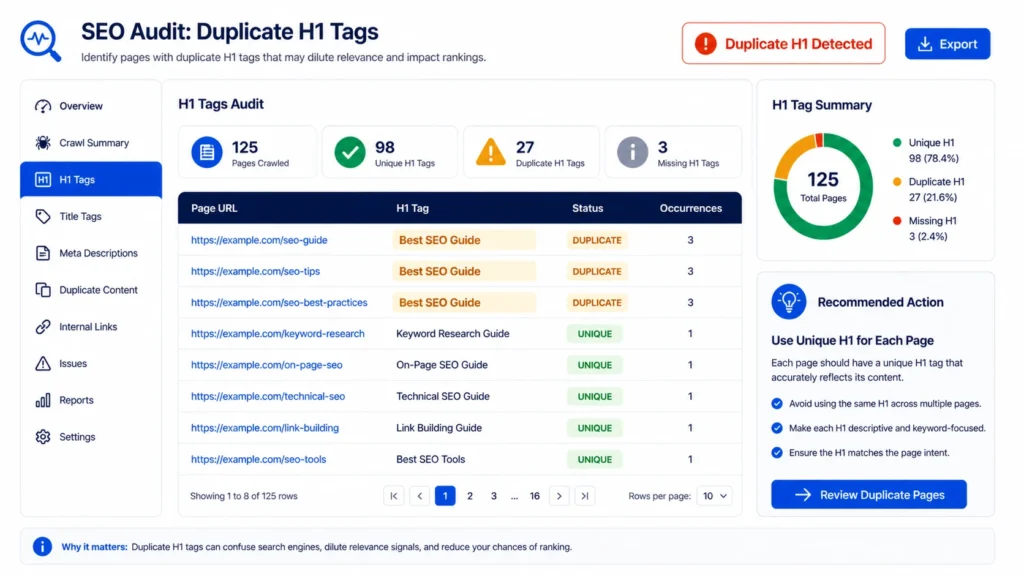
Duplicate H1 tags — where multiple pages on your site share the same H1 text — are a more serious SEO problem than multiple H1s on a single page. They create direct competition between your own pages for the same keyword, confuse Google’s ability to differentiate your content, and dilute rankings across the board.
Common Causes of Duplicate H1 Tags
- Template-driven CMS sites: When page templates auto-generate H1s from the same field type without unique customization, identical H1s propagate across dozens of pages.
- E-commerce product variants: Product pages for colour/size variants of the same item often share identical H1 headings — a critical Shopify SEO problem.
- Location pages built from templates: Businesses creating city-specific pages often copy content including H1 tags, creating a duplicate content and duplicate heading issue simultaneously.
- Pagination: Blog archives and category pages sometimes inherit the same H1 across paginated versions (/page/2, /page/3).
How to Find and Fix Duplicate H1 Tags
- Use Screaming Frog or Semrush to crawl your site and export the H1 tag report.
- Sort H1 tags alphabetically to identify exact duplicates immediately.
- For each duplicate: determine whether both pages should exist — if they’re nearly identical, consider consolidating with a canonical tag.
- For pages that legitimately need to coexist: rewrite each H1 to be unique, specific, and relevant to that page’s distinct content.
- For CMS-generated duplicates: work with your developer to ensure the H1 pulls from a unique, editable field per page.
- Re-crawl after fixes to confirm all duplicate H1s are resolved.
Identifying duplicate H1 tags is a standard deliverable of a professional seo audit dubai — alongside duplicate meta descriptions, missing headings, thin content, and other on-page issues that systematically undermine rankings across your entire site.
Understanding H1 Tags for Shopify SEO
Shopify has specific H1 tag behaviors that differ from standard WordPress or custom-built websites. Understanding these nuances is essential for Shopify store owners who want to maximize their organic search performance.
How Shopify Handles H1 Tags by Default
In most default Shopify themes, the product title automatically becomes the H1 tag on product pages, and the collection name becomes the H1 on collection pages. This means many Shopify stores have their H1 tags controlled by the theme template — not by manual content entry.
The problem: product titles optimized for conversion (‘Midnight Blue Linen Blazer — Free Returns’) may not be optimized for search (‘Men’s Linen Blazer Dubai — Breathable Summer Fashion’). The H1 and the conversion-focused product title serve different masters — and on Shopify, they’re often the same field.
Shopify H1 SEO Best Practices
- Review your theme’s template files to identify exactly which field populates the H1 tag on product, collection, and content pages.
- If your theme allows it, create a separate SEO-specific heading field that feeds the H1 independently from the product title.
- Use Shopify’s Edit website SEO section to optimize your title tag (what appears in Google) — but also ensure the page-level H1 is keyword-optimized.
- For collection pages, write H1 tags that target category-level commercial keywords: ‘Men’s Formal Shirts Dubai’ rather than ‘Shirts’.
- Audit all product pages for duplicate H1s caused by product variant pages sharing the same parent product title.
Hidden H1 Tag SEO: A Critical Technical Issue
A hidden H1 tag is an H1 element that is present in the page’s HTML but visually hidden from users — either through CSS (display:none, visibility:hidden, font-size:0) or by positioning it off-screen. This practice was historically used to ‘stuff’ keywords into H1 tags without affecting the visible design.
What Google Thinks of Hidden H1 Tags
Hidden H1 tags that contain keyword-rich text not visible to users are considered a cloaking technique by Google — showing different content to search engines than to users. This is explicitly against Google’s Webmaster Guidelines and can result in manual actions (ranking penalties) on your site.
However, some hidden H1s are unintentional — caused by CSS conflicts, page builder issues, or theme updates that hide previously visible headings. These must also be fixed, not because of penalty risk, but because a hidden H1 delivers no user experience value, which undermines the engagement signals that support rankings.
How to Detect Hidden H1 Tags
- Use Chrome DevTools (F12) to inspect the H1 element on any page and check its computed CSS styles.
- In Screaming Frog, crawl your site and review the H1 report — then manually check any page where the H1 text doesn’t match what you see on the page visually.
- Use the Rich Results Test or URL Inspection in Google Search Console to see how Google renders your page and what it reads as the H1.
If your google search console service dubai management reveals unexpected H1 tag behavior in Google’s rendering of your pages — including hidden headings or heading mismatches — this is a technical signal that warrants immediate investigation and resolution before it develops into a crawling or indexation problem.
Expert Insight: The H1 Tag Mistakes I See Most Often
Expert Insight
After auditing hundreds of websites, the H1 tag problems I encounter most are always the same three: (1) the H1 is identical to the title tag — wasting the opportunity to add nuance or additional keyword context; (2) the H1 is a generic brand tagline like ‘Quality You Can Trust’ that provides zero topical signal to Google; and (3) the H1 is missing entirely — either not rendered by the CMS or hidden by CSS. None of these are catastrophic individually, but collectively they represent significant on-page SEO value left on the table. The fix is almost always 30 minutes of work per page. The impact can be sustained ranking improvements that compound for months.— Senior On-Page SEO Specialist, 10+ Years Experience
Case Study: H1 Tag Optimization That Moved Rankings in 6 Weeks
Legal Services Firm — Dubai
The Situation:
A Dubai-based legal services firm had 34 service pages, all using generic H1 tags generated from their navigation menu structure: ‘Our Services’, ‘Practice Areas’, ‘Legal Team’. None contained target keywords. Their average position for commercial legal service terms was 14.2 (Page 2).
The H1 Audit Findings:
- 28 of 34 pages had keyword-absent H1 tags
- 6 pages had duplicate H1 tags (‘Legal Expertise in Dubai’ appeared on 4 pages)
- The homepage H1 was hidden by a CSS override from a previous design update
- No H1 tags contained UAE-specific location modifiers
The Optimization Actions:
- Rewrote all 34 H1 tags with unique, keyword-rich, location-specific headings
- Fixed the hidden homepage H1 via CSS correction
- Restructured H2 tags to target secondary and long-tail keywords in each service area
- Aligned H1 tags with the search intent of each page’s primary target keyword
Results (6 Weeks, No Backlink Activity):
Average position improved from 14.2 to 7.8 — moving from deep Page 2 to top of Page 1
- 12 target keywords moved from Page 2 to Page 1
- Organic impressions increased by 156%
- Enquiry form completions from organic search increased by 44%
Key Lesson: H1 tags are the lowest-hanging fruit in on-page SEO — and the most consistently under-optimized element across professional service websites.
How to Write H1 Tags for SEO: A Practical Formula
Every H1 tag you write should pass a five-point check before publishing. Apply this formula consistently and your heading quality will be uniformly strong across your entire site.
The Five-Point H1 SEO Checklist
- Contains the primary keyword: Is your target keyword present? Is it in the first half of the heading?
- Matches search intent: Does the H1 reflect what a user searching your target keyword actually wants — information, comparison, a service, or a product?
- Is unique on your site: Does any other page on your domain use this exact or near-identical H1?
- Is between 20 and 70 characters: Count precisely — not words, characters.
- Is visible and rendered correctly: Does the H1 appear visually on the page? Is it styled as the dominant heading?
H1 Tag Templates by Page Type
- Blog post: [Primary Keyword]: How to [Achieve Outcome] — ‘H1 Tag SEO: How to Write Perfect Headings in 2026’
- Service page: [Service] [Location] | [Benefit] — ‘Corporate Legal Services Dubai | Expert Commercial Lawyers’
- Product page: [Product Name] [Key Attribute] [Location/Context] — ‘Linen Blazer Men Dubai | Breathable Summer Formal’
- Location page: [Service] in [City/District] — ‘Digital Marketing Services in Business Bay Dubai’
- Homepage: [Brand Promise] | [Primary Keyword Category] — ‘Dubai’s Trusted SEO Agency | Organic Growth Specialists’
These templates are part of the systematic approach taught in our complete guide on how to write SEO content — which covers keyword integration, heading structure, meta optimization, and content depth as a unified on-page framework that maximizes both ranking potential and user engagement.
H1 Tags and Their Connection to Other On-Page SEO Elements
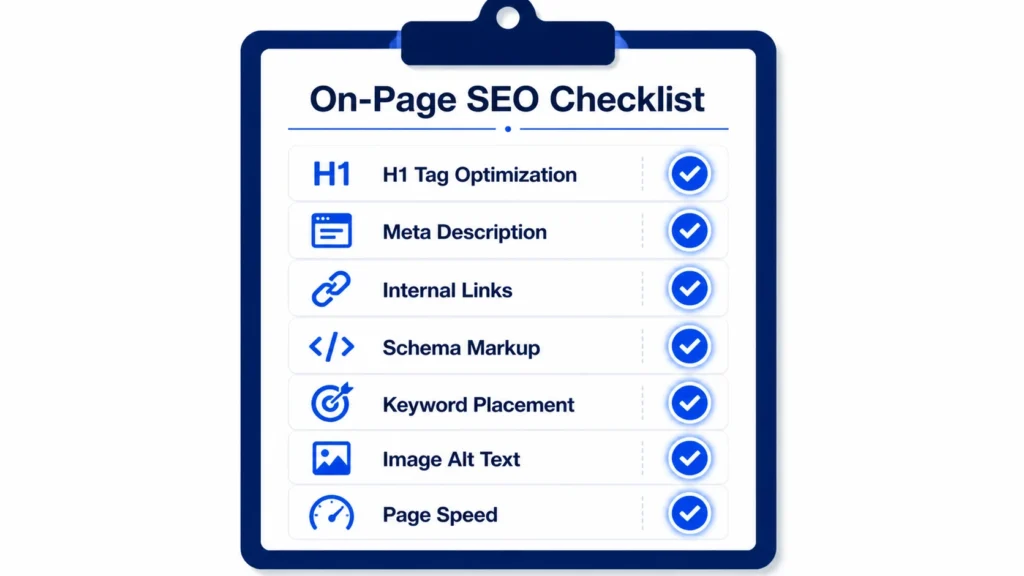
The H1 tag is powerful in isolation — but it reaches its full potential when properly coordinated with the other on-page elements that together form a complete page optimization strategy.
H1 and Meta Description
Your meta description should echo the promise made by your H1 — not repeat it verbatim, but reinforce the same core topic and benefit. A user who reads your H1 in search results (which Google often uses as the title link) should feel that the meta description naturally continues the conversation. Our guide to how to write meta description covers this coordination in detail, showing how the H1 and meta description work as a tag-team to win clicks and set user expectations.
H1 and Schema Markup
Schema markup and H1 tags are complementary signals. Your H1 communicates topic to Google in human-readable text. Schema markup communicates context in machine-readable structured data. For example, a LocalBusiness schema combined with an H1 tag like ‘Professional Accounting Services in DIFC Dubai’ creates overlapping explicit signals that reinforce each other. Learn more about structured data coordination in our how to add schema markup guide.
H1 and Internal Linking
The keyword context established by your H1 tag also informs how other pages on your site should reference and link to this page. Anchor text in internal links pointing to a page should echo — not necessarily replicate — the H1’s primary keyword. This reinforces the topical signal from multiple directions. Our internal linking SEO expert guide shows exactly how to build this coordinated anchor text and heading structure across your content architecture.
For businesses in Dubai that want all of these on-page elements — H1 tags, meta descriptions, schema markup, internal linking, and content quality — optimized as a coordinated system, a professional seo agency dubai delivers the systematic implementation and ongoing management that individual optimization efforts rarely achieve.
Understanding why SEO is important frames the commercial context for every on-page decision — including H1 tag optimization. Every correctly written H1 tag is a micro-investment in search visibility that compounds over time as your content library grows and your domain authority increases.
Frequently Asked Questions: H1 Tag SEO
What is an H1 tag in SEO?
An H1 tag is the primary HTML heading element on a web page (<h1>text</h1>). It tells both search engines and users what the page is about — making it the most important on-page heading for SEO.
Do H1 tags matter for SEO?
Yes — H1 tags are a relevance signal for Google. They help Google understand the core topic of your page, contribute to featured snippet eligibility, and influence user engagement metrics that affect rankings indirectly.
How many H1 tags per page for SEO?
One. While Google technically supports multiple H1 tags, best practice is one H1 per page for clarity of topical focus, better user experience, and stronger relevance signalling to search engines.
Are multiple H1 tags bad for SEO?
Not a penalty, but not optimal. Multiple H1 tags split your topical focus, create user experience confusion, and cause accessibility issues. Always default to one H1 per page.
What is the ideal H1 tag length?
20–70 characters is the recommended range. Long enough to include your keyword and a descriptive phrase, short enough to be scannable and visually dominant on the page.
Where should the keyword go in an H1 tag?
Place your primary keyword in the first half of the H1 — ideally within the first three words. Front-loaded keywords receive stronger relevance weighting than keywords positioned at the end of the heading.
Can the H1 and title tag be the same?
They can be similar but should ideally be slightly different. The title tag must win the click from search results. The H1 should confirm the page topic and keep the visitor reading — it can add more descriptive context than the title tag allows.
What are duplicate H1 tags in SEO?
Duplicate H1 tags occur when multiple pages on your site share the same H1 text. This dilutes keyword focus, confuses Google’s ability to differentiate your pages, and weakens rankings across all affected pages.
What is a hidden H1 tag?
A hidden H1 tag is present in the page HTML but not visible to users — hidden via CSS. Intentionally hiding H1 tags to manipulate search engines is a cloaking violation. Unintentional hidden H1s should be fixed for both compliance and UX reasons.
What is the difference between H1 and H2 tags in SEO?
The H1 is the primary page heading — one per page, covering the page’s main topic. H2 tags are section headings — multiple per page, organizing content into thematic subsections that support and expand on the H1’s topic.
How do I add an H1 tag in WordPress?
In the Gutenberg block editor, the ‘Heading’ block defaults to H2. Change the heading level to H1 in the block settings panel on the right. Alternatively, the page/post Title field at the top of the editor automatically generates an H1 in most WordPress themes.
Can I use keywords in H2 and H3 tags?
Absolutely — and you should. H2 tags are excellent for secondary and LSI keywords. H3 tags work well for long-tail and question-based keywords. The full heading hierarchy is a keyword placement opportunity, not just the H1.
Does missing H1 tag hurt SEO?
Yes. A missing H1 leaves Google without your strongest on-page topical signal. Google may interpret the page’s topic from other signals, but you lose direct control over relevance alignment — which is always suboptimal.
What is H1 SEO for Shopify?
In Shopify, H1 tags are typically auto-generated from the product or collection title. Shopify store owners should audit their theme templates to understand which fields populate H1 tags and ensure product titles are optimized for both conversion and search.
How do I check if my H1 tags are correctly implemented?
Use Screaming Frog to crawl your site and export the H1 tag report. Alternatively, right-click any page in Chrome, select ‘View Page Source’, and search for <h1> to see the tag. Google Search Console’s URL Inspection tool also shows how Google reads your page structure.
Conclusion: Perfect Your H1 Tag SEO Starting Today
The H1 tag SEO opportunity is available to every website owner right now — no budget, no backlinks, no technical complexity required. Just clear thinking about what your page covers, what your target user is searching for, and how to communicate both in a single, well-crafted heading sentence.
The rules are straightforward: one H1 per page, primary keyword front-loaded, 20–70 characters, unique across your site, visible to users, and aligned with search intent. Apply these consistently — across every page you publish from today — and the cumulative SEO impact will be substantial.
Fix your existing pages too. An audit of your current H1 tags will almost certainly reveal opportunities: generic headings without keywords, duplicate H1s across service or product pages, hidden headings caused by CSS conflicts, and keyword-absent homepage headlines. Each fix is a direct relevance signal improvement that Google can act on the next time it crawls your page.
For businesses in Dubai and the UAE that want professional support with heading optimization, content strategy, and the full on-page SEO framework, our on page seo service in dubai covers H1 tag optimization as part of a comprehensive page-level strategy — ensuring every heading, every meta tag, every internal link, and every content element works together to maximize your organic search visibility.
Start now: Open your three most commercially important pages. Check their H1 tags against the five-point checklist in this guide. Make the improvements. Then re-submit those URLs in Google Search Console for re-indexing. That is H1 tag SEO in practice — and it is one of the most direct, fastest-acting improvements in your SEO toolkit.