


Internal linking SEO is the practice of connecting pages within your own website using clickable hyperlinks. It helps search engines discover and understand your content, distributes ranking authority across your site, and guides users to relevant pages — all of which directly improve your organic rankings, crawl efficiency, and time-on-site. Every internal link you add is a deliberate signal to Google about which content matters most.
Key Takeaways
- Internal linking SEO is one of the most underutilized ranking tactics — it costs nothing and delivers compounding returns.
- Internal links distribute PageRank (link equity) from high-authority pages to pages you want to rank higher.
- Keyword-rich anchor text in internal links sends explicit relevance signals to Google about the destination page.
- A healthy site should have no orphaned pages — every page should receive at least one internal link from a related page.
- WordPress users can manage internal links manually, via plugins (Link Whisper, Yoast), or through internal link suggestion features.
- Nofollow internal links waste link equity — in most cases, internal links should remain dofollow to pass full SEO value.
What Is Internal Linking in SEO?
Internal links are hyperlinks that connect one page on your website to another page on the same website. Unlike external links — which point to other domains — internal links keep users within your own site while simultaneously helping search engines map the relationship between your pages.
In SEO terms, internal linking serves three simultaneous functions: it enables crawlability (Googlebot follows internal links to discover pages), it distributes link equity (authority flows from linked pages to destination pages), and it signals topical relevance (anchor text tells Google what the destination page is about). Understanding what is SEO and how does it work is a foundational context for appreciating why internal links are so deeply embedded in how Google evaluates and ranks content.
Internal Linking SEO Benefits: Why Google Cares
Internal linking is one of the few SEO tactics that simultaneously helps Google understand your site AND improves user experience — making it a dual-purpose investment that compounds over time.
How Internal Linking Increases SEO Value
- PageRank distribution: Google’s original algorithm uses link equity (PageRank) to evaluate page authority. Internal links pass fractional PageRank from the linking page to the destination — meaning a link from your homepage to a target page is a direct authority boost for that page.
- Crawl efficiency: Googlebot discovers pages by following links. Pages with zero internal links pointing to them (orphaned pages) may rarely be crawled — limiting their ability to rank regardless of content quality.
- Topical authority signals: Interconnected content on related topics creates a topical cluster that Google interprets as deep subject matter expertise — a major ranking factor in 2026.
- Reduced bounce rate: Relevant internal links keep visitors engaged, increasing dwell time and pages-per-session — both of which Google interprets as user satisfaction signals.
- Indexation speed: New content linked from established pages gets crawled and indexed significantly faster than content with no internal links.
According to Google’s documentation on how links work, Googlebot follows links to discover content across the web — making internal links the primary mechanism for ensuring all your pages are findable and indexable.
Quantifying the Internal Linking SEO Impact
Studies across thousands of websites consistently show that pages receiving more internal links rank higher — even when controlling for other factors. A Semrush analysis of 11 million search results found that internal linking is among the top 10 ranking factors for Google. For businesses in competitive markets, the difference between a page with 3 internal links and one with 15 can be the difference between Page 2 and Page 1.
Internal Links vs External Links: Key Differences
Understanding what are internal links and external links — and how they serve different SEO functions — is essential for building a balanced link strategy.
| Factor | Internal Links | External Links |
| Definition | Link to another page on same domain | Link to a page on a different domain |
| Primary SEO Role | Distribute link equity, aid crawlability | Build domain authority (backlinks) |
| Control | Fully in your control | Earned from other sites |
| Anchor Text | Always optimizable by you | Determined by linking site |
| Follow Status | Should be dofollow (default) | Can be nofollow (common) |
| Cost | Free — zero acquisition cost | Requires link building effort/budget |
| Volume Limit | No hard limit — scale as needed | More is generally better, quality matters |
While backlinks and internal links both contribute to SEO authority, they serve different roles in your strategy. Backlinks build your domain’s overall authority from external sources. Internal links deploy that authority efficiently across your own pages. Both are essential — one without the other limits your ranking potential. For businesses focused on building external authority alongside internal structure, dedicated off page seo services in dubai complement an internal linking strategy to create a complete SEO authority system.
Anchor Text Internal Links SEO: Getting It Right
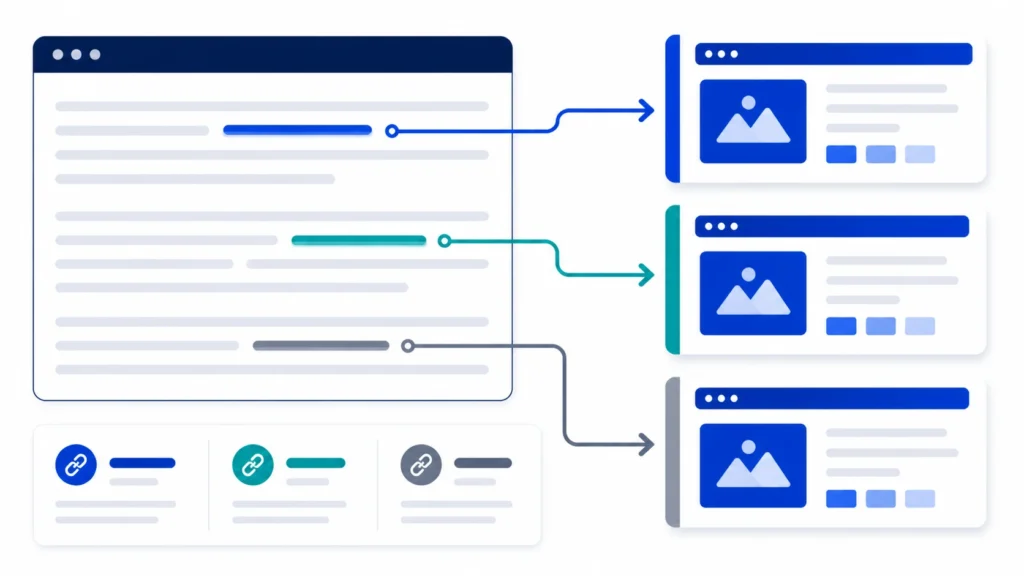
Anchor text is the visible, clickable text of a hyperlink. In internal linking SEO, anchor text is one of the most powerful on-page signals you control — it tells Google explicitly what the destination page is about.
Types of Anchor Text and When to Use Each
- Exact match: Anchor text = exact target keyword of destination page. e.g., ‘internal linking SEO’ linking to this article. Use sparingly — 15–25% of internal links to any given page.
- Partial match: Includes the target keyword plus surrounding words. e.g., ‘our guide to internal linking SEO best practices’. Most common and natural — aim for 40–50% of links.
- Branded: Company name as anchor. e.g., ‘Visit SEO Dubai Pro’. Low relevance signal but builds brand association.
- Generic: ‘Click here’, ‘read more’, ‘learn more’. Provides no topical signal to Google. Minimize use — under 10% of internal links.
- Descriptive natural: Describes the linked content without the exact keyword. e.g., ‘our step-by-step WordPress guide’. Good for variety and readability.
Pro Tips: Anchor Text Diversity
Never use identical anchor text for every internal link pointing to the same page. Google’s algorithms are sophisticated enough to interpret over-optimized internal anchor patterns as manipulation. Vary your anchor text naturally — exact match occasionally, partial match most often, descriptive text to fill the balance. The goal is contextual relevance, not mechanical repetition.
How Many Internal Links Per Page SEO: The Practical Answer
There is no official Google limit on the number of internal links per page. However, practical SEO guidelines and real-world testing point to a clear optimal range.
Guidelines by Page Type
- Homepage: 10–30 internal links appropriate — it’s your highest-authority page and should distribute equity widely.
- Pillar / hub pages: 15–30 internal links to related cluster content — this is the architecture of topic authority.
- Blog posts / articles: 3–8 internal links per 1,000 words is the widely accepted range. For a 2,500-word article, 8–15 links is appropriate.
- Product / service pages: 5–12 internal links — linking to related products, supporting blog content, and category pages.
- Category / archive pages: Natural links to all items in the category plus related category cross-links.
The quality rule: Every internal link must earn its place. Link when it genuinely helps the reader find relevant information. Pages with 50+ links that exist purely for SEO purposes dilute link equity to the point of diminishing returns — and provide a poor user experience that hurts dwell time.
How to Use Internal Linking for Topic Authority
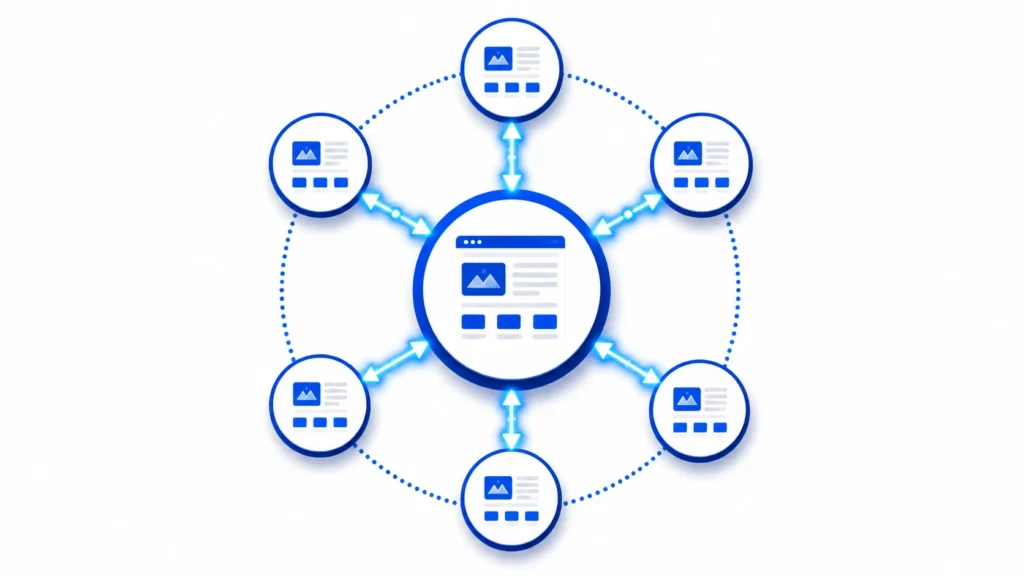
Topic authority is the measure of how comprehensively and authoritatively your website covers a subject. Internal linking is the architectural tool that builds topic authority — by explicitly connecting related content into clusters that signal deep expertise to Google.
The Pillar-Cluster Model
The most effective internal linking architecture for topic authority is the pillar-cluster model. A pillar page covers a broad topic comprehensively. Cluster pages dive deep into specific subtopics. Every cluster page links back to the pillar. The pillar links out to every cluster. The result is a tightly interconnected content hub that Google recognizes as authoritative on the entire subject.
Pillar-Cluster Internal Linking Example
- Pillar page: ‘Complete Guide to SEO for Dubai Businesses’ — links to 8–12 cluster pages.
- Cluster page 1: ‘Keyword Research Dubai’ — links back to pillar + to 2–3 related clusters.
- Cluster page 2: ‘On-Page SEO Dubai’ — links back to pillar + to related clusters.
- Cluster page 3: ‘Local SEO Services Dubai’ — links back to pillar + to related clusters.
Every page in the cluster reinforces every other page. Google sees a deeply interconnected, topically comprehensive content hub — and ranks the entire cluster higher as a result.
For content that sits within a topic cluster, the writing quality and keyword integration are equally critical. Our guide on how to write SEO content walks through the content optimization framework that makes cluster pages rank-worthy in the first place — ensuring your internal linking architecture is built on content that deserves to be linked.
Internal Linking in WordPress: Step-by-Step Guide
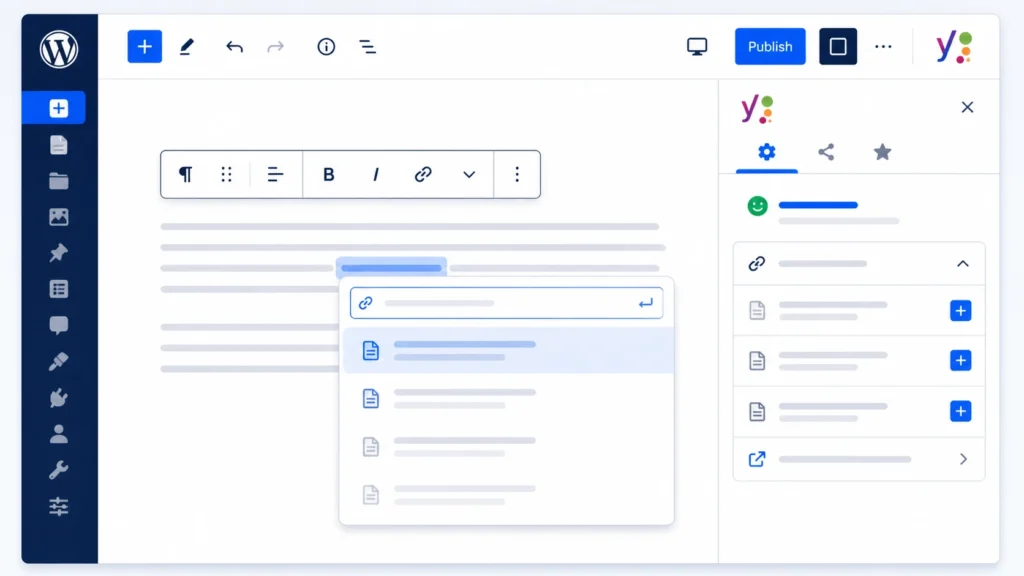
WordPress is the most widely used CMS in the world, and it offers multiple ways to add and manage internal links — from manual insertion to automated plugin suggestions.
How to Add Internal Links in WordPress Manually
- Open your Post or Page in the WordPress Block Editor (Gutenberg).
- Highlight the anchor text you want to link.
- Click the link icon in the toolbar (or press Ctrl+K / Cmd+K).
- Type the title of the destination page — WordPress will auto-suggest matching pages.
- Select the correct page from the dropdown suggestions.
- Press Enter to apply the link.
- Verify the link opens correctly in preview before publishing.
How to Create an Internal Link in WordPress Classic Editor
- Highlight the anchor text in your content.
- Click the chain-link icon in the formatting toolbar.
- In the URL field, type or paste the destination page URL.
- Optionally check ‘Open in new tab’ — though for internal links, same-tab is recommended.
- Click Add Link and save.
WordPress Internal Link Suggestion Features
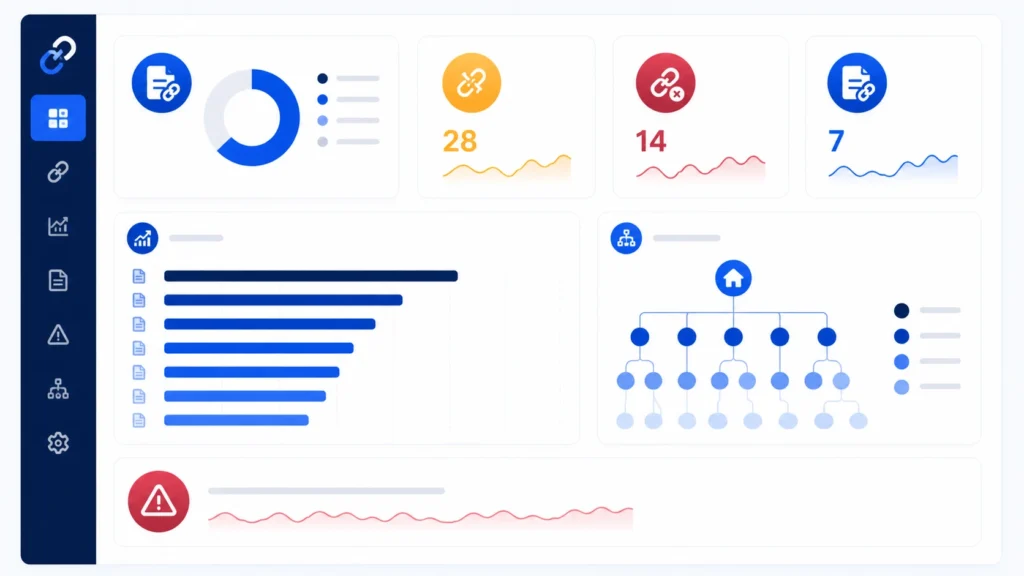
Yoast SEO
includes an internal linking suggestions panel in the post editor sidebar — it analyses your content and suggests relevant pages from your site to link to, based on semantic matching. This is particularly valuable for large sites where remembering all relevant content is impractical.
Rank Math
offers similar internal link suggestions and also shows how many internal links each page currently receives — helping you identify underlinked pages that need more internal link equity flowing to them.
WordPress Internal Links Plugin Options
- Link Whisper: The most powerful dedicated internal link building plugin. Uses AI to suggest contextual internal links across your entire content library. Supports bulk link insertion and provides an internal link audit dashboard.
- Yoast SEO (Premium): Internal link suggestions integrated directly into the post editor — seamless for teams already using Yoast.
- Internal Link Juicer: Automatically inserts internal links based on keyword rules you define — useful for large sites with hundreds of pages.
- Rank Math: Free plan includes internal link suggestions; Pro adds more advanced link reporting.
For businesses seeking expert support with WordPress technical implementation and SEO architecture, on page seo service in dubai covers internal link strategy alongside meta configuration, content optimization, and heading structure — ensuring your entire on-page foundation is built to rank.
How to Fix Nofollow Internal Links in SEO
Nofollow internal links are a common — and often unintentional — SEO problem. When an internal link carries the rel=”nofollow” attribute, Google treats it as a hint to not pass PageRank through it. This means you’re wasting the very link equity you’re trying to distribute.
Why Nofollow Internal Links Are Problematic
External nofollow links make sense — they tell Google you don’t vouch for a third-party site. But internal nofollow links make no sense from an SEO perspective. You’re linking to your own content. If you don’t ‘vouch’ for your own pages, why do they exist?
Nofollow internal links commonly appear when: certain page builders add nofollow by default, developers manually set nofollow on navigation or footer links, plugins insert nofollow on automatically generated link blocks, or CMS templates apply nofollow to pagination links.
How to Fix Internal Nofollow Links in WordPress
- Use Screaming Frog to crawl your site and export all internal links with their rel attribute values.
- Filter the export to show only links where rel = ‘nofollow’.
- For each nofollow internal link found, identify whether it was added manually or by a plugin/template.
- For manual links: edit the post/page and remove the nofollow attribute from the link HTML.
- For plugin-generated nofollow links: check the plugin settings for a ‘nofollow’ toggle and disable it for internal links.
- For template-level nofollow: consult your developer to remove it from the theme’s link output functions.
- Re-crawl after fixes to confirm all nofollow attributes have been removed from internal links.
Identifying nofollow issues, orphaned pages, and link equity gaps is precisely what a professional seo audit dubai surfaces — giving you a complete picture of your internal link architecture’s health and a prioritized list of fixes ranked by SEO impact.
How to Audit Website Internal Links: The Complete Process
An internal link audit reveals orphaned pages, equity leaks, over-linked pages, and anchor text imbalances. Run this process every 6 months — or immediately after any major site restructure.
Internal Link Audit Steps
- Full site crawl: Use Screaming Frog, Ahrefs Site Audit, or Semrush to crawl your entire domain. Export the complete internal link report.
- Identify orphaned pages: Filter for pages with 0 internal links pointing to them. Every orphaned page is an indexation risk and a missed authority distribution opportunity.
- Review link equity distribution: Which pages receive the most internal links? Do those pages align with your commercial priorities? High-priority pages (service pages, money pages) should receive the most internal links.
- Audit anchor text diversity: For your top 10 target pages, review the anchor text of every internal link pointing to them. Is it varied? Does it include keyword-rich variants?
- Check nofollow status: Flag all internal links with rel=nofollow and schedule fixes.
- Identify broken internal links: 404 errors on internal link destinations waste link equity and damage user experience. Fix or redirect immediately.
- Review link depth: Important pages should be reachable within 3 clicks from the homepage. Pages buried 5+ clicks deep receive minimal crawl attention and limited equity flow.
Expert Insight
“The internal link audit is the single most neglected SEO exercise I encounter. Clients invest heavily in content and backlinks — and then leave their internal link architecture completely unmanaged. The result is almost always the same: high-authority pages that could be passing significant equity to commercial pages are instead linking to low-priority blog posts written three years ago. When we restructure internal linking with commercial intent as the guiding principle — pointing authority from high-traffic content to revenue-driving service pages — we consistently see ranking improvements within 6–8 weeks, with zero new content and zero new backlinks required.”
— Senior SEO Strategist, 10+ Years Experience
Using Google Search Console to Monitor Internal Links
Google Search Console provides native internal link data that most site owners overlook. The Links report shows exactly how Google has discovered and attributed internal links across your site — invaluable for auditing and prioritization.
Where to Find Internal Link Data in Search Console
- Log in to Google Search Console and select your property.
- Navigate to Links in the left sidebar.
- Under ‘Internal links’, click ‘More’ to see the full report.
- The report shows your most linked-to pages — these receive the most internal link equity.
- Cross-reference with your commercial priority pages: are your revenue pages in the top 10 most internally linked pages?
- If a priority page has very few internal links in this report, it’s a clear signal to add more internal links pointing to it from relevant content.
For professional monitoring and interpretation of Search Console data in the context of a full SEO strategy, google search console service dubai provides expert management of your Search Console property — translating data into actionable fixes for internal links, crawl errors, indexation issues, and performance trends.
Case Study: How Internal Link Restructuring Boosted Rankings Without New Content
B2B Services Company — Dubai
The Situation:
A B2B professional services company in Dubai had 80 published blog posts and 12 service pages. Despite generating reasonable traffic to blog content, their core service pages were ranked on Pages 3–5 for their target commercial keywords. They had not published new content or built new backlinks in 4 months.
The Internal Link Analysis:
Audit revealed: 23 orphaned pages (no internal links pointing to them), service pages received an average of 2.1 internal links each, high-traffic blog posts were linking almost exclusively to other blog posts rather than commercial service pages, and 31 internal links carried nofollow attributes from a legacy plugin.
The Restructuring Actions:
- Removed nofollow from all 31 internal links
- Added 3–5 contextual internal links from relevant blog posts to each service page
- Built 3 new pillar pages linking to clusters of existing content
- Resolved 23 orphaned pages by linking each from 2+ relevant articles
- Revised anchor text from generic (‘read more’) to keyword-rich variants
Results (8 Weeks, No New Content, No New Backlinks):
- 7 service pages moved from Pages 3–4 to Page 1
- Organic clicks to service pages increased by 112%
- Average crawl depth of service pages improved from 4.8 to 2.3 clicks
- Enquiries from organic search increased by 38% in the same period
Key Lesson: Internal linking is the fastest, cheapest, highest-ROI SEO lever most businesses have never properly pulled.
Technical SEO and Internal Linking: The Crawlability Connection
Internal linking is fundamentally a technical SEO discipline as much as a content strategy. The way your internal links are structured determines how efficiently Googlebot can discover, crawl, and re-crawl your content — directly affecting how quickly pages rank after publication or updates.
Key Technical Considerations for Internal Links
- Crawl budget efficiency: Sites with thousands of pages have a finite crawl budget — the number of pages Google will crawl in a given period. Poorly structured internal links waste crawl budget on low-value pages. Strategic internal linking directs Googlebot to your highest-priority content first.
- JavaScript-rendered links: Links generated by JavaScript may not be crawled as reliably as HTML links. For critical internal links, use standard HTML <a> tags rather than JavaScript event handlers.
- Redirect chains: Internal links pointing to redirected URLs (301, 302) lose a fraction of link equity at each redirect hop. Update internal links to point directly to the final destination URL.
- Canonical tags and internal links: Internal links should point to canonical (preferred) versions of pages. Linking to non-canonical URLs creates confusing signals for Google’s indexation decisions.
These technical nuances are precisely why internal linking strategy is a core component of technical seo service dubai — combining correct HTML link implementation, crawl budget optimization, redirect resolution, and canonical alignment to ensure every internal link delivers its maximum SEO value.
Understanding why SEO is important grounds the technical details of internal linking in their commercial context — every crawl efficiency improvement and equity distribution decision ultimately translates into more visible rankings and more qualified organic traffic.
Internal Linking SEO Best Practices: The Essential Checklist
Apply these principles consistently across every new piece of content you publish and every audit you conduct.
Do’s
- Link from high-authority pages (homepage, pillar pages, popular posts) to pages you want to rank higher.
- Use keyword-rich, varied anchor text that naturally describes the destination page’s content.
- Add internal links within body content — contextual links within paragraphs carry more weight than navigation or footer links.
- Ensure every new page receives at least 2–3 internal links from relevant existing content before or immediately after publication.
- Review and update internal links when you publish new content that is relevant to older pages.
- Use breadcrumbs — they provide sitewide internal linking and help users and bots understand site hierarchy.
Don’ts
- Don’t use ‘click here’ or ‘read more’ as anchor text — these provide zero topical signal to Google.
- Don’t create internal links to pages under canonical tags, redirect chains, or 404 errors.
- Don’t add nofollow attributes to internal links — you’re blocking your own link equity.
- Don’t over-link — stuffing 40+ internal links into a single post dilutes their individual value.
- Don’t link to irrelevant pages just to inflate link counts — contextual relevance is what makes internal links valuable.
For businesses that want a complete audit and optimization of their on-page signals including internal linking, meta descriptions, title tags, and content structure, our how to write meta description guide covers the companion on-page element that, combined with strong internal linking, maximizes both your rankings and your click-through rate from search results.
And for businesses in Dubai looking to understand keyword research as the foundation for deciding which pages to prioritize in their internal link strategy, our guide on what is a keyword in SEO provides the keyword intelligence layer that makes internal linking decisions data-driven rather than intuitive.
Frequently Asked Questions: Internal Linking SEO
What is internal linking in SEO?
Internal linking SEO is the practice of hyperlinking pages within the same website to help search engines discover content, distribute link equity (PageRank), and signal topical relevance between related pages.
How does internal linking increase SEO value?
Internal links pass PageRank from high-authority pages to target pages, accelerate crawling and indexation, signal topical relevance through anchor text, and improve user engagement metrics — all of which are measurable ranking factors.
How many internal links per page is ideal for SEO?
For blog posts: 3–8 links per 1,000 words. For pillar pages: 15–30 links to cluster content. For service pages: 5–12 contextual links. No hard limit exists — prioritize relevance and user value over volume.
What are internal links vs external links?
Internal links connect pages within the same domain and distribute your site’s own link equity. External links point to or come from different domains and contribute to your site’s overall domain authority when received as backlinks.
How to add internal links in WordPress?
Highlight your anchor text, press Ctrl+K (or click the link icon), search for the destination page title, and select from the auto-suggestion dropdown. Plugins like Yoast SEO and Link Whisper also provide automated internal link suggestions.
Are nofollow internal links bad for SEO?
Yes — nofollow internal links block PageRank transfer between your own pages, wasting link equity you could be distributing. Unless there’s a specific reason to nofollow (e.g., login pages), all internal links should be dofollow by default.
How to fix nofollow internal links in WordPress?
Crawl your site with Screaming Frog to identify nofollow internal links. Remove nofollow attributes manually in post HTML, or adjust plugin settings that are adding nofollow automatically. Check theme templates for sitewide nofollow assignments.
What is anchor text in internal links?
Anchor text is the visible, clickable text of a hyperlink. In internal linking SEO, keyword-rich anchor text sends direct relevance signals to Google about the destination page’s topic — influencing what keywords that page can rank for.
How to audit internal links on a website?
Use Screaming Frog or Ahrefs to crawl your site and export the internal links report. Look for orphaned pages, nofollow links, broken links, redirect chains, over-linked pages, and anchor text patterns. Prioritize fixes by commercial page impact.
What are orphaned pages in SEO?
Orphaned pages are website pages with zero internal links pointing to them. Google may rarely crawl them, they receive no link equity, and they struggle to rank regardless of content quality. Every page needs at least 2–3 internal links.
What is the best WordPress plugin for internal links?
Link Whisper is the most powerful dedicated internal linking plugin — it uses AI to suggest contextual links across your content library. Yoast SEO Premium and Rank Math also include internal link suggestion features for integrated SEO management.
How do internal links help with topic authority?
The pillar-cluster model uses internal links to connect a comprehensive pillar page to multiple deep-dive cluster pages. Google reads this interconnected architecture as evidence of topical depth and expertise — boosting rankings for the entire cluster.
Should internal links open in a new tab?
For internal links, same-tab opening is recommended. Opening internal links in new tabs disrupts the browsing flow and reduces engagement with the destination page. Reserve new-tab behavior for external links only.
How long does it take for internal linking to improve rankings?
In most cases, ranking improvements from internal link restructuring are visible within 4–8 weeks — faster than most SEO tactics because no new content or backlinks are required. Results depend on how frequently Googlebot crawls your site.
Do internal links from navigation count for SEO?
Yes, but contextual body links carry significantly more weight than navigation or footer links. Google assigns greater relevance value to links embedded within page content, surrounded by related text, than to links in sitewide navigation structures.
Conclusion: Build Your Internal Linking SEO Strategy Today
Internal linking SEO is one of the most accessible, cost-free, and consistently high-impact optimization strategies available to any website — from solo bloggers to enterprise e-commerce platforms. Every page you publish is an opportunity to strengthen the link equity network of your entire site. Every piece of anchor text is a relevance signal you choose to send Google. Every link from a high-authority page to a target page is a direct ranking boost that costs nothing but thoughtful execution.
The approach is systematic: audit your current internal link architecture, identify orphaned pages and equity leaks, restructure links with commercial intent as your guiding principle, fix nofollow issues, implement the pillar-cluster model for topic authority, and monitor results in Google Search Console. Then repeat the process every six months as your content library grows.
For businesses in Dubai and across the UAE that want professional support building a complete SEO architecture — including internal linking strategy, keyword mapping, technical implementation, and off-page authority building — working with a specialist seo agency dubai delivers results that in-house implementation rarely achieves alone. The technical depth required for enterprise-scale internal linking optimization demands both the right tools and the right expertise.
Start today with a single action: open your five highest-traffic blog posts and add at least two internal links from each — pointing to your most commercially important pages, with keyword-rich anchor text. That one hour of work will deliver measurable internal linking SEO improvements within weeks. That is the power of internal links — and why no serious SEO strategy should leave them unmanaged.