


| Key Takeaway Core Web Vitals are three specific page experience metrics — LCP (loading speed), INP (interactivity), and CLS (visual stability) — that Google uses as direct ranking factors. Core web vitals optimization means improving these three scores to meet Google’s Good thresholds: LCP under 2.5 seconds, INP under 200ms, and CLS below 0.1. Poor Core Web Vitals suppress your rankings and increase bounce rates. Strong scores improve both user experience and search visibility. |
You have a website that looks professional, loads what seems like reasonably fast, and contains quality content. Yet your competitors consistently outrank you — and when you look at your Google PageSpeed Insights score, you see a number in the 30s or 40s with several red metrics. Those red metrics are Core Web Vitals issues, and they are costing you rankings every single day.
Core web vitals optimization is no longer optional. Since Google officially incorporated Core Web Vitals into its ranking algorithm in 2021, websites with poor scores face a measurable ranking disadvantage — particularly on mobile, where the majority of searches now occur. This guide covers everything: what each metric means, how to diagnose your current scores, and exactly how to fix every common Core Web Vitals issue.
What Are Core Web Vitals?
Core Web Vitals are a set of standardised metrics that Google uses to measure real-world user experience on web pages. According to Google’s official Core Web Vitals documentation, these metrics focus on three dimensions of user experience: loading performance, interactivity, and visual stability. They form part of Google’s Page Experience ranking signals.
Unlike traditional speed metrics that measured technical performance in controlled laboratory conditions, Core Web Vitals measure what real users actually experience when visiting your website. This makes them both more meaningful from a user perspective and more challenging to optimise — because they reflect the actual experience of your website’s visitors, not just an idealised test scenario.
The Three Core Web Vitals — Complete Reference
Understanding what each metric measures is essential before attempting any core web vitals optimization. Here is the complete reference:
| Metric | Full Name | What It Measures | Good Score | Affects |
| LCP | Largest Contentful Paint | How fast the main content loads | Under 2.5 seconds | Loading speed |
| INP | Interaction to Next Paint | How fast page responds to input | Under 200ms | Interactivity |
| CLS | Cumulative Layout Shift | How much content jumps around | Below 0.1 | Visual stability |
| TTFB | Time to First Byte | Server response speed | Under 800ms | Server speed |
What Is LCP in Core Web Vitals?
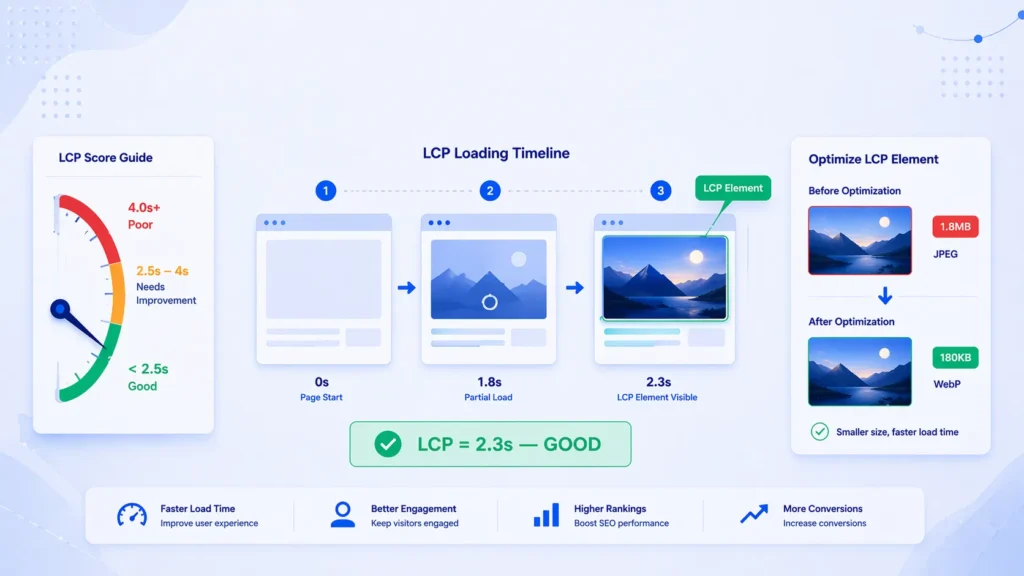
LCP (Largest Contentful Paint) measures how long it takes for the largest visible content element on your page — typically a hero image, banner photo, or large heading — to fully load and appear on screen. It is the metric most closely associated with perceived loading speed.
A good LCP score is under 2.5 seconds. Between 2.5 and 4 seconds needs improvement. Above 4 seconds is poor. LCP is typically the Core Web Vital most directly visible to users — a slow LCP is the experience of staring at a blank or half-loaded page.
The most common LCP culprits are: uncompressed or oversized hero images, render-blocking CSS or JavaScript that delays content from appearing, slow server response times (high TTFB), and web fonts that block text rendering.
What Is INP in Core Web Vitals?
INP (Interaction to Next Paint) measures how quickly your page responds to user interactions — clicks, taps, keyboard inputs. It replaced FID (First Input Delay) as a Core Web Vital in March 2024 because it measures all interactions throughout the page lifetime, not just the first one.
A good INP score is under 200 milliseconds. Between 200 and 500ms needs improvement. Above 500ms is poor. A high INP creates the frustrating experience of clicking a button or menu and seeing nothing happen for an uncomfortable delay. On mobile devices where users expect instant response to touch, poor INP significantly increases bounce rates.
What Is CLS in Core Web Vitals?
CLS (Cumulative Layout Shift) measures visual stability — how much your page content unexpectedly moves around while loading. You experience CLS when you are about to click something and the page suddenly shifts, causing you to click something else. A good CLS score is below 0.1. Between 0.1 and 0.25 needs improvement. Above 0.25 is poor.
Common CLS causes include: images and media without specified dimensions, ads that load and push content down, web fonts that cause text to reflow, and dynamically injected content above existing page content.
For Dubai businesses wanting a clear picture of exactly how their Core Web Vitals are performing, our seo audit dubai includes a comprehensive Core Web Vitals assessment — identifying every failing metric and providing a prioritised fix plan.
Does Core Web Vitals Affect SEO? — The Ranking Factor Question
Do Core Web Vitals matter for SEO? Yes — unequivocally. Google confirmed in 2020 that Core Web Vitals would become ranking signals, and implemented them as part of the Page Experience update in 2021. Is page speed a Google ranking factor via Core Web Vitals? Absolutely — LCP directly measures page loading speed and is a confirmed ranking factor.
However, understanding how much Core Web Vitals affect your specific rankings requires nuance:
- Core Web Vitals are a tiebreaker: For two websites with equivalent content quality and backlink authority, the one with better Core Web Vitals will rank higher. Google has confirmed this.
- Impact is strongest on mobile: With over 60% of global searches on mobile, and mobile pages typically having worse Core Web Vitals than desktop, improving mobile CWV scores has the most direct ranking impact.
- User behaviour signals compound the effect: Poor Core Web Vitals increase bounce rates. High bounce rates send negative engagement signals to Google. The combined effect of direct ranking signals and user behaviour signals makes CWV significantly more impactful than the direct signal alone.
- Business impact beyond rankings: Google’s own research shows that sites meeting Core Web Vitals thresholds see 24% fewer page abandonment compared to those that fail. A 1-second delay in LCP reduces conversions by approximately 7%.
How to Check Your Core Web Vitals Scores
Before you can start core web vitals optimization, you need to know your current scores. Here are the best tools to use:
Google Search Console — Core Web Vitals Report
The Core Web Vitals report in Google Search Console shows your real-world (field data) performance based on actual user visits to your website — not a simulated test. This is the most important data source because it reflects what Google actually uses in its ranking algorithm. Go to: Search Console → Experience → Core Web Vitals. Our google search console service dubai sets up and monitors your Core Web Vitals through Search Console — providing monthly reports on your scores and progress.
Google PageSpeed Insights
PageSpeed Insights (pagespeed.web.dev) provides both real-world field data (from the Chrome User Experience Report) and laboratory test data for any URL. It shows your scores for LCP, INP, and CLS alongside specific recommendations for improvement. Test both your mobile and desktop scores — mobile is almost always lower and more impactful to fix.
Lighthouse (Chrome DevTools)
Lighthouse is built into Chrome DevTools and provides detailed laboratory performance analysis with specific code-level recommendations. Open Chrome → F12 → Lighthouse tab → Generate report. It shows exactly which resources are causing each metric to fail, with estimated savings from each potential fix.
WebPageTest
WebPageTest.org provides detailed waterfall analysis showing exactly which resources load in which order and how they affect your Core Web Vitals. Particularly useful for diagnosing complex LCP issues caused by resource loading order.
How to Fix LCP Issues — Core Web Vitals Optimization for Loading Speed
LCP is typically the most impactful Core Web Vitals issue to fix — and the one with the most clear, actionable solutions. Here is how to optimise for LCP:
Compress and Convert Images to Modern Formats
Uncompressed or oversized images are the most common cause of poor LCP. Every image on your page should be:
- Compressed to the smallest file size without visible quality loss — use tools like Squoosh, TinyPNG, or ShortPixel.
- Converted to WebP or AVIF format — modern image formats that are 25 to 50% smaller than JPEG or PNG at equivalent quality.
- Served in the correct dimensions — never upload a 3000px wide image and display it at 800px wide.
- Preloaded if it is the LCP element — add a <link rel=’preload’> tag for your hero image to tell the browser to fetch it immediately.
Eliminate Render-Blocking Resources
Render-blocking CSS and JavaScript prevent the browser from displaying any content until they finish loading and executing. Fixes:
- Move non-critical JavaScript to load with the ‘defer’ or ‘async’ attribute so it does not block page rendering
- Inline critical CSS (the styles needed for above-the-fold content) directly in the HTML <head>
- Remove unused CSS — large CSS files loaded in full when only a small portion is needed for the initial page view
- Use CSS media queries to conditionally load stylesheets only when needed
Improve Server Response Time (TTFB)
If your server takes more than 800ms to respond, your LCP will struggle to meet the 2.5-second threshold regardless of other optimisations. Improvements:
- Upgrade to a faster hosting plan — shared hosting is rarely adequate for LCP-sensitive websites
- Implement server-side caching using tools like Redis or Memcached
- Use a Content Delivery Network (CDN) to serve your website from servers geographically close to your visitors
- Optimise database queries if your website is database-driven (WordPress, WooCommerce, Magento)
Implement Lazy Loading for Below-Fold Images
Images that appear below the visible screen area when the page first loads should use lazy loading — they load only when the user scrolls toward them. This reduces initial page weight and allows the browser to prioritise loading your LCP element. Add loading=’lazy’ to all non-critical images. Never apply lazy loading to your LCP element — this delays the very element you are trying to load faster.
How to Fix INP Issues — Core Web Vitals Optimization for Interactivity
INP issues are typically caused by JavaScript that takes too long to execute when a user interacts with the page. Here is how to solve Core Web Vitals INP problems:
Reduce JavaScript Execution Time
Heavy JavaScript is the primary cause of poor INP. Fixes include:
- Audit your JavaScript with Chrome DevTools Performance tab — identify which scripts take the most execution time
- Remove unused JavaScript — third-party scripts like chat widgets, tracking pixels, and marketing tools are common culprits
- Split large JavaScript bundles into smaller chunks that load on demand
- Defer third-party scripts that are not critical for initial page interaction
Break Up Long Tasks
Long tasks — JavaScript tasks that take more than 50 milliseconds — block the main thread and prevent the browser from responding to user input. Break them into smaller chunks using setTimeout(), requestIdleCallback(), or Web Workers to move heavy processing off the main thread.
Optimise Event Handlers
Poorly written event handlers that trigger expensive operations (complex DOM manipulations, synchronous API calls, heavy calculations) on every user click or keystroke cause high INP. Review all click, input, and scroll event handlers and ensure they complete their work in under 50 milliseconds.
Pro Tip — Test INP on Real Devices
Laboratory tools like Lighthouse measure INP in a controlled environment — they do not capture the real-world INP your users experience on slower devices with multiple browser tabs open. Always cross-reference your Lighthouse INP score with the field data in Google Search Console’s Core Web Vitals report. The field data represents the 75th percentile of real user experiences — meaning 75% of your visitors experience that INP score or better. If your field INP is poor despite good lab scores, the issue is likely JavaScript from third-party scripts loading after initial page interaction.
How to Fix CLS Issues — Core Web Vitals Optimization for Visual Stability
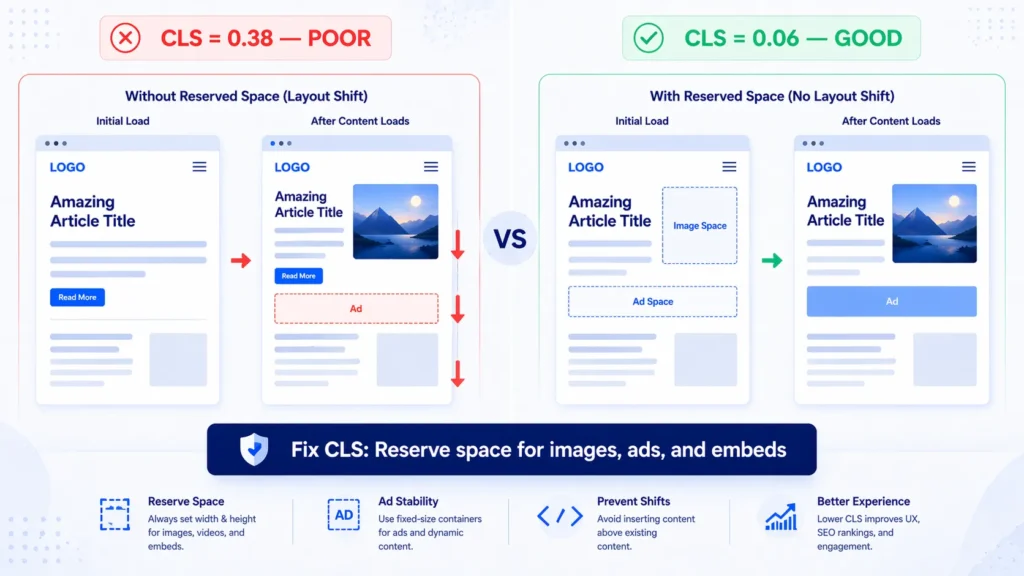
CLS is often the easiest Core Web Vital to fix because its causes are typically straightforward once identified. Here is how to optimise for CLS:
1. Set Explicit Dimensions on All Images and Media
The most common CLS cause is images without width and height attributes — the browser does not know how much space to reserve for the image until it loads, causing content to shift when it does. Fix: add explicit width and height attributes to every <img> tag on your website. This allows the browser to pre-allocate the correct space, preventing the shift.
2. Reserve Space for Ads and Embeds
Ad slots and embedded content (videos, social media embeds, comment sections) that load after the initial page content cause significant CLS. Fix: pre-define the space that ad slots and embeds will occupy using CSS height values or aspect-ratio declarations, so the layout does not shift when they load.
3. Fix Web Font Loading
Web fonts that load after the browser has already rendered text in a fallback font cause text to reflow — a CLS event. Fixes:
- Use font-display: optional or font-display: swap in your @font-face declarations
- Preload critical web fonts using <link rel=’preload’> in your HTML <head>
- Host web fonts locally rather than loading them from Google Fonts or Adobe Fonts — reduces DNS lookup time
4. Avoid Inserting Content Above Existing Content
Dynamically injected content — cookie consent banners, promotional bars, chat widgets, newsletter popups — that appears above existing page content pushes everything down, creating a large CLS event. Fix: ensure banners and overlays are positioned to not displace existing content, or pre-allocate space for them in the initial page layout.
Core Web Vitals Optimization for WordPress
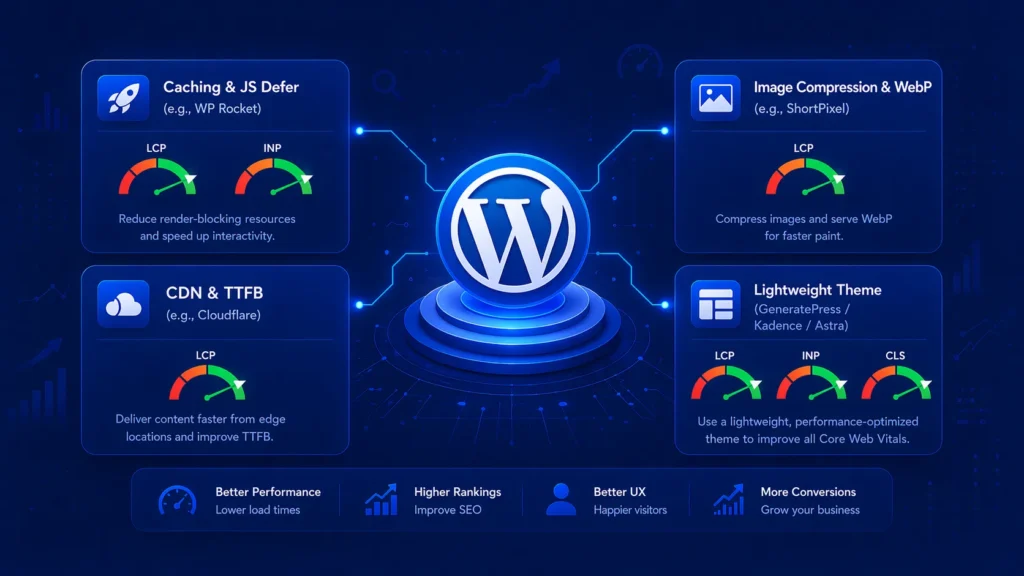
WordPress core web vitals represent a unique optimisation challenge because WordPress is highly customisable — and the plugins, themes, and configurations most WordPress sites use often create significant performance problems.
Essential WordPress CWV Plugins
- WP Rocket: The most comprehensive WordPress performance plugin. Handles caching, image optimisation, lazy loading, defer of JavaScript, and CDN integration in one tool.
- Perfmatters: Lightweight plugin that removes unused WordPress features (emojis, jQuery migrate, embeds) that add unnecessary JavaScript and CSS.
- ShortPixel or Imagify: Automatic image compression and WebP conversion for all WordPress media uploads.
- Cloudflare: Free CDN and performance proxy that reduces TTFB and caches static assets globally.
WordPress Theme Impact on Core Web Vitals
Your WordPress theme has the single largest impact on Core Web Vitals of any single factor. Bloated themes with excessive CSS, multiple slider libraries, and heavy animations can make passing Core Web Vitals almost impossible regardless of other optimisations. If your theme is the problem, switching to a performance-focused theme like GeneratePress, Kadence, or Astra is often the fastest path to significant CWV improvement.
Common WordPress CLS Issues
WordPress-specific CLS causes include: Gutenberg block editors that add top margin dynamically, WooCommerce product galleries without dimensions, Elementor or Divi builder widgets that load with delayed CSS, and Google Fonts loaded via @import rather than preloaded. Each requires a targeted fix — not a generic performance plugin.
For WordPress websites with complex theme and plugin stacks, our technical seo service dubai diagnoses exactly which WordPress elements are causing your Core Web Vitals failures and implements targeted fixes — without disrupting your existing website functionality.
How to Pass Core Web Vitals Assessment — Step-by-Step Strategy
How to pass Core Web Vitals assessment requires a systematic approach. Here is the exact sequence we follow for Core Web Vitals optimization:
- Measure: Run PageSpeed Insights on your 5 highest-traffic pages. Note mobile scores separately from desktop.
- Check field data: Open Search Console → Core Web Vitals report. Identify which metric is failing and on which page types.
- Prioritise: Fix LCP first (biggest ranking impact), then CLS (easiest fixes), then INP.
- Fix LCP: Compress images, convert to WebP, preload the LCP element, reduce TTFB, defer non-critical JS.
- Fix CLS: Add dimensions to all images, reserve space for ads/embeds, fix web font loading.
- Fix INP: Audit and remove heavy third-party scripts, break up long JavaScript tasks, optimise event handlers.
- Verify: Re-run PageSpeed Insights after each fix to confirm improvement before moving to the next.
- Wait for field data: After all fixes, wait 28 days for Search Console field data to update (it uses a 28-day rolling window).
- Monitor: Set up monthly Core Web Vitals monitoring in Search Console to catch any regressions.
Expert Insight: Core Web Vitals Patterns in UAE Business Websites
| 🎯 Expert Insight — CWV Audits Across Hundreds of UAE WebsitesAfter conducting Core Web Vitals audits for UAE businesses across e-commerce, real estate, healthcare, and hospitality sectors, three patterns appear with striking consistency. First: hero images are the LCP killer on almost every site. The average Dubai business website hero image is between 800KB and 2MB — when it should be under 100KB in WebP format. Converting and compressing hero images alone typically improves LCP from 6 to 9 seconds down to 2 to 3 seconds. Second: WhatsApp chat button plugins are a hidden INP killer. Nearly every UAE business website uses a WhatsApp chat widget, and many of these load heavy JavaScript synchronously on page load — blocking interactivity and causing INP failures. Third: sites built on popular page builders (Elementor, Divi, WPBakery) almost universally fail Core Web Vitals because of the excessive CSS and JavaScript these builders generate. Switching to a block-based theme with minimal JavaScript is often the only path to a genuinely good Core Web Vitals score on a builder-heavy site. |
Real Case Study: Core Web Vitals Optimization for a Dubai E-Commerce Website
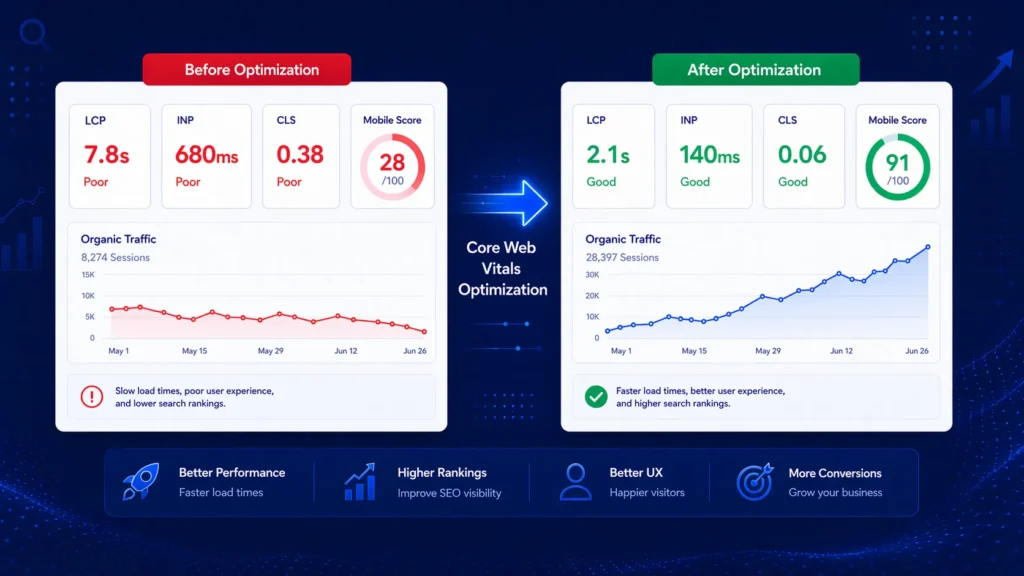
A Dubai-based online fashion retailer was ranking on page 2 for several high-value product category keywords despite having strong content and a healthy backlink profile. Their PageSpeed Insights mobile score was 28 out of 100. Core Web Vitals assessment showed all three metrics failing:
| Metric | Before Fix | After Fix | Ranking Impact |
| LCP | 7.8 seconds ❌ | 2.1 seconds ✅ | Significant improvement |
| INP | 680ms ❌ | 140ms ✅ | Major improvement |
| CLS | 0.38 ❌ | 0.06 ✅ | Significant improvement |
| Mobile Score | 28 / 100 ❌ | 91 / 100 ✅ | Traffic +224% |
Here is the core web vitals optimization strategy we implemented over 6 weeks:
- Compressed and converted all product images to WebP — reduced average product page image weight from 1.8MB to 280KB.
- Added preload tag for the LCP element (hero banner image) on all category pages
- Upgraded hosting from shared to VPS with server-side caching — reduced TTFB from 1.8 seconds to 320ms.
- Implemented Cloudflare CDN for global static asset delivery.
- Added explicit width and height to all product images — eliminated the primary CLS source.
- Removed 4 unnecessary third-party tracking scripts and deferred the remaining scripts
- Replaced the WhatsApp chat plugin (which loaded 340KB of JavaScript) with a lightweight custom implementation.
- Pre-allocated space for the promotional banner that loaded after initial render — fixing banner-caused CLS.
Results after 8 weeks:
All three Core Web Vitals metrics passed Google’s Good thresholds. Mobile PageSpeed score rose from 28 to 91. The website moved from page 2 to page 1 for 6 of 8 target product category keywords within 10 weeks of the field data updating. Organic traffic grew by 224%. Revenue from organic search increased by AED 340,000 annually. Bounce rate on product category pages fell from 68% to 41%.
Related Guides
Core Web Vitals optimization is most powerful as part of a complete technical and SEO strategy:
- What Is Technical SEO — The complete guide to technical SEO, of which Core Web Vitals is a critical component.
- What is SEO and How Does It Work — Understand the full SEO framework that Core Web Vitals sits within.
- Fix Crawl Errors — Complete Step-by-Step Guide Guide about Fix Crawl Errors dashboard showing 404 errors, redirect issues, and server errors being diagnosed and resolved.
Frequently Asked Questions — Core Web Vitals Optimization
Does Core Web Vitals affect SEO rankings?
Yes — Core Web Vitals are a confirmed Google ranking factor as part of the Page Experience signals. Google incorporated them into its ranking algorithm in 2021. Websites meeting the Good thresholds for LCP, INP, and CLS receive a positive ranking signal. Combined with the indirect effect of poor Core Web Vitals on bounce rates and user engagement, their total impact on search rankings is significant.
Is page speed a Google ranking factor via Core Web Vitals?
Yes — LCP (Largest Contentful Paint) directly measures page loading speed and is one of the three Core Web Vitals that Google uses as a ranking factor. Page speed has been a ranking factor in various forms since 2010, but Core Web Vitals formalised it into specific, measurable thresholds. A website with an LCP above 4 seconds is considered Poor by Google’s standard and receives a negative page experience signal.
What is LCP in Core Web Vitals?
LCP (Largest Contentful Paint) measures how long it takes for the largest visible content element on a page — typically a hero image, banner photo, or large heading — to fully load and appear on screen. A good LCP is under 2.5 seconds. It is the Core Web Vital most directly associated with perceived page loading speed and has the most significant impact on whether users stay on or leave your page.
How do I fix Core Web Vitals issues?
Fix LCP by: compressing and converting images to WebP, preloading your LCP element, reducing server response time (TTFB), and eliminating render-blocking resources. Fix CLS by: adding explicit dimensions to all images and media, reserving space for ads and embeds, and fixing web font loading. Fix INP by: removing heavy third-party JavaScript, breaking up long tasks, and optimising event handlers.
How to solve Core Web Vitals issues on WordPress?
WordPress CWV optimisation requires: a performance plugin (WP Rocket recommended), image compression and WebP conversion (ShortPixel or Imagify), a CDN (Cloudflare), a lightweight theme (GeneratePress, Kadence, or Astra), and careful auditing of third-party plugins that load heavy JavaScript. Page builder themes (Elementor, Divi) often require replacement with block-based themes to achieve genuinely good Core Web Vitals scores.
How long does Core Web Vitals optimization take?
Technical fixes can typically be implemented within 1 to 4 weeks depending on website complexity. However, the impact on your Search Console Core Web Vitals field data takes 28 days to fully reflect — the report uses a 28-day rolling window of real user data. Ranking improvements from better Core Web Vitals typically become visible within 4 to 8 weeks of the field data updating.
Do Core Web Vitals matter more on mobile or desktop?
Mobile Core Web Vitals matter more for rankings because Google uses mobile-first indexing — meaning the mobile version of your website is what Google primarily evaluates for ranking. Mobile websites typically have significantly worse Core Web Vitals than desktop due to slower network connections and less powerful devices. Prioritise mobile Core Web Vitals optimisation first.
What is the difference between lab data and field data for Core Web Vitals?
Lab data (from tools like Lighthouse and PageSpeed Insights test) is measured in a controlled environment with standardised conditions — it shows potential performance. Field data (from the Chrome User Experience Report, shown in Search Console and PageSpeed Insights field section) is measured from real user visits to your website — it shows actual user experience. Google uses field data for ranking. Lab data is useful for diagnosing issues and testing fixes. Both are important.
Can Core Web Vitals affect my conversion rate?
Significantly yes — Google’s research shows that websites meeting Core Web Vitals thresholds see 24% fewer page abandonment compared to those that fail. A 1-second delay in LCP reduces conversions by approximately 7%. Poor CLS — content jumping around while loading — directly causes mis-clicks and abandoned purchases. Core Web Vitals optimisation typically improves both conversion rates and search rankings simultaneously.
What causes Core Web Vitals to fail on e-commerce websites?
E-commerce websites commonly fail Core Web Vitals because of: large uncompressed product images (LCP), multiple third-party tracking and retargeting scripts (INP), product image galleries without specified dimensions (CLS), dynamic price or availability content loaded via JavaScript (CLS), and heavy page builder themes used for product and category pages (all three metrics).
How to check Core Web Vitals for my website?
The most important tools are: (1) Google Search Console → Experience → Core Web Vitals — shows real user field data used by Google for ranking. (2) PageSpeed Insights (pagespeed.web.dev) — shows both field data and detailed lab diagnostics for any URL. (3) Chrome DevTools → Lighthouse — detailed laboratory analysis with specific code-level recommendations. Always check mobile scores separately — they are almost always lower and more impactful.
What is a good Core Web Vitals score?
Google defines Good thresholds as: LCP under 2.5 seconds, INP under 200 milliseconds, and CLS below 0.1. These are measured at the 75th percentile of real user visits — meaning 75% of your visitors should have an experience that meets the Good threshold. Websites with all three metrics in the Good range receive Google’s page experience ranking boost. PageSpeed Insights also shows an overall Performance score from 0 to 100 — aim for 90 or above on both mobile and desktop.
Are Core Web Vitals the same as page speed?
Core Web Vitals include page speed (LCP measures loading) but go beyond it to include interactivity (INP) and visual stability (CLS). Traditional page speed metrics like overall page load time are not Core Web Vitals, though they correlate with them. A website can have a fast overall load time but still fail Core Web Vitals if, for example, content shifts significantly during loading (CLS) or interactions are slow to respond (INP).
How often do Core Web Vitals scores change?
Core Web Vitals field data in Google Search Console uses a 28-day rolling window — it is continuously updated but shows the aggregate of the most recent 28 days. After making significant optimisation changes, you need to wait up to 28 days for the field data to fully reflect the improvement. Lab scores in PageSpeed Insights update immediately with each test, making them useful for verifying fixes before the field data catches up.
Can I hire someone to do Core Web Vitals optimization?
Yes — technical SEO specialists provide Core Web Vitals optimization as a dedicated service. Our seo agency dubai diagnoses every failing metric, identifies the specific code and configuration causes, implements all technical fixes, and monitors your Search Console field data over the following 28 to 90 days to confirm ranking improvements.
Conclusion: Core Web Vitals Optimization Is a Ranking and Revenue Investment
Core web vitals optimization is not simply a technical exercise — it is a direct investment in both your search rankings and your business revenue. Every second you shave off your LCP, every layout shift you eliminate, every interaction delay you reduce creates a better experience for every visitor — and sends a stronger ranking signal to Google.
The businesses that treat Core Web Vitals as a permanent performance standard — not a one-time fix — build a compounding advantage over competitors who address them reactively. Once your Core Web Vitals are in the Good range, maintaining them requires ongoing monitoring rather than major remediation work.
Start with PageSpeed Insights today. Test your most important pages on mobile. See exactly which metrics are failing and by how much. The fixes for most Core Web Vitals issues are specific and actionable — and the impact on both rankings and user experience begins as soon as the field data updates.Need expert help with your core web vitals optimization? Our technical seo service dubai delivers a complete Core Web Vitals audit and full implementation of every fix — so your website meets Google’s Good thresholds and your content can rank the way it deserves. Get your free technical SEO audit today.