



| Key Takeaway A slow WordPress website costs you rankings, visitors, and revenue. The most impactful ways to speed up a WordPress website are: upgrade your hosting to VPS or managed WordPress, compress and convert images to WebP, implement caching with WP Rocket, use a CDN, defer non-critical JavaScript, and remove unused plugins. Even one second of improvement in load time can reduce bounce rates by 32% and significantly lift your Google rankings. |
A one-second delay in page load time reduces conversions by 7%. A three-second load time causes 53% of mobile users to abandon the page before it even finishes loading. If you have a WordPress website that is taking more than two seconds to load, you are not just losing search rankings — you are actively losing customers every hour of every day.
This guide covers exactly how to speed up WordPress website performance using the same strategies we apply professionally for Dubai businesses. Every technique here is actionable, tested, and ranked by impact — so you know exactly where to start and what to prioritise.
Why Is Website Speed Important?
Website speed is important because it directly impacts three business-critical outcomes: search rankings, user experience, and revenue. These are not theoretical benefits — they are measurable, documented effects that compound with every tenth of a second you improve.
Impact of Load Speed on Website User Experience
The impact of load speed on website user experience is both immediate and lasting. Users form an opinion about your website within 50 milliseconds of it loading — and slow load times trigger an instinctive trust and quality judgment that no amount of good content can overcome. Research consistently shows:
- Pages that load in 1 second have a 3x higher conversion rate than pages that take 5 seconds
- A 100-millisecond delay in load time reduces conversion rates by approximately 7%
- 53% of mobile users abandon a page that takes longer than 3 seconds to load
- Users are 5x more likely to leave a page if it takes over 10 seconds to load on mobile
- Slow websites are associated with lower brand trust — users equate performance with professionalism
| Load Time | Bounce Rate Impact | Conversion Impact | SEO Impact |
| Under 1 second | Minimal — best | Optimal conversions | Strong ranking signal |
| 1–2.5 seconds | Low — acceptable | Good conversions | Good — passes CWV |
| 2.5–4 seconds | Moderate increase | -7% per second | Needs improvement |
| 4–6 seconds | High — 32% higher | Significant loss | Poor CWV signal |
| Over 6 seconds | Very high — 90%+ | Critical revenue loss | Severe penalty |
Why Website Speed Is a Google Ranking Factor
Page speed has been a Google ranking signal since 2010, and Core Web Vitals — Google’s standardised speed metrics — have been a confirmed ranking factor since 2021. According to Google Search Central’s page experience documentation, websites that meet the Core Web Vitals Good thresholds receive a positive ranking signal compared to those that fail. For WordPress websites specifically — which power over 43% of the internet — speed optimisation is often the fastest path to meaningful ranking improvements.
For Dubai businesses whose WordPress websites are currently underperforming in search, a professional seo audit dubai identifies exactly which speed issues are suppressing your rankings — and quantifies the ranking impact of fixing each one.
What Is a Good Website Speed?
A good website speed is a page that loads its main content (LCP) in under 2.5 seconds on mobile and under 1.5 seconds on desktop. Google PageSpeed Insights assigns scores from 0 to 100 — a good score is 90 or above on both mobile and desktop.
For competitive industries in Dubai — real estate, healthcare, legal, and e-commerce — a good website speed is not just about meeting the minimum threshold. It is about being faster than your direct competitors. If your competitor’s page loads in 2.1 seconds and yours loads in 2.4 seconds, they have a measurable speed advantage in Google’s ranking algorithm.
What Affects Website Speed — The Main Culprits
Before diving into fixes, understanding what affects website speed on WordPress helps you prioritise the most impactful improvements:
- Hosting quality: The single biggest factor. Shared hosting can produce TTFB (Time to First Byte) of 1 to 2 seconds — before a single byte of your page content has been delivered.
- Unoptimised images: Images account for 50 to 75% of total page weight on most websites. How website image sizes affect page speed is direct — a 2MB hero image forces a slow download regardless of other optimisations.
- Excessive plugins: Every active WordPress plugin adds PHP processing time and often adds its own CSS and JavaScript files to every page load.
- Bloated theme: Premium WordPress themes often include hundreds of unused features that load CSS and JavaScript on every page — regardless of whether those features are used.
- No caching: Without caching, WordPress rebuilds every page from scratch on every visit — a computationally expensive process that dramatically increases server response time.
- No CDN: Without a Content Delivery Network, all visitors — regardless of location — download your content from a single server, creating distance-based latency.
- Unoptimised database: WordPress databases accumulate post revisions, spam comments, transients, and orphaned data over time, increasing query processing time.
Strategy 1: Upgrade Your Hosting — The Highest-Impact Fix
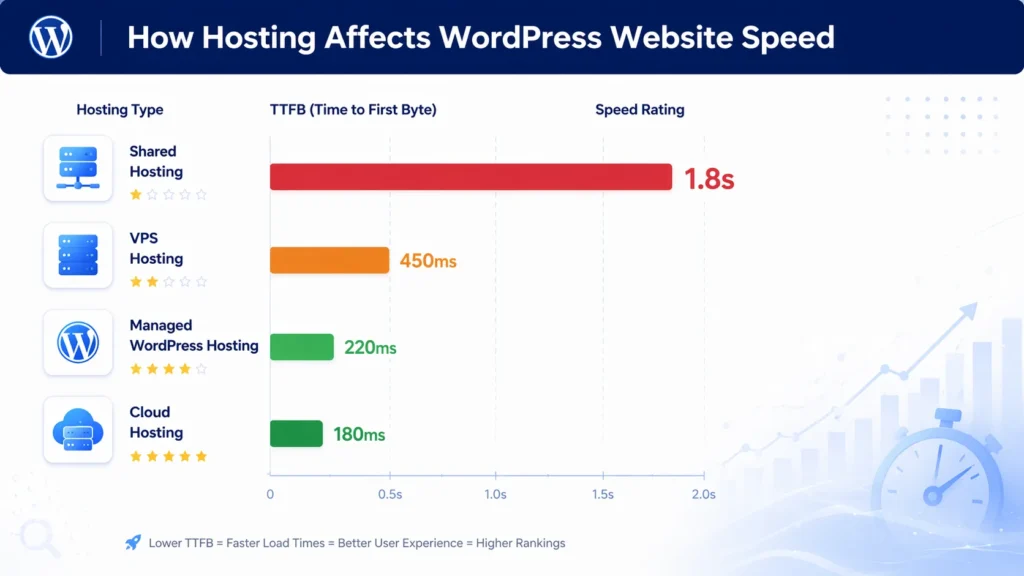
How web hosting affects website speed and performance is more significant than any other single factor. Your hosting is the foundation of your website’s speed — and if the foundation is slow, no amount of optimisation on top of it will produce genuinely fast results.
| Hosting Type | Avg TTFB | Cost | Best For | Speed Rating |
| Shared Hosting | 800ms–2s | Lowest | New/static sites | ⭐⭐ |
| VPS Hosting | 300–600ms | Medium | SMB WordPress | ⭐⭐⭐⭐ |
| Managed WP Hosting | 100–300ms | Higher | High-traffic WP | ⭐⭐⭐⭐⭐ |
| Cloud Hosting | 100–400ms | Variable | Scalable sites | ⭐⭐⭐⭐⭐ |
Signs Your Hosting Is the Speed Problem
- Your Time to First Byte (TTFB) is consistently above 800ms in PageSpeed Insights
- Your server response time shows as the largest opportunity in your PageSpeed report
- Your website slows significantly during peak traffic hours
- You are on a shared hosting plan with unlimited websites
What to Look for in WordPress Hosting
For WordPress websites that need to pass Core Web Vitals and rank competitively, look for: NVMe SSD storage, PHP 8.1 or higher, built-in object caching (Redis or Memcached), server-level caching, data centres in or close to your target audience’s location, and a track record of TTFB under 300ms.
Managed WordPress hosting providers like WP Engine, Kinsta, and Cloudways are specifically optimised for WordPress performance — their server configurations produce TTFB of 100 to 300ms compared to 800ms to 2 seconds on shared hosting. For Dubai businesses targeting UAE audiences, a server location in the Middle East or Europe provides the lowest latency.
Strategy 2: Optimise Images — The Fastest Wins
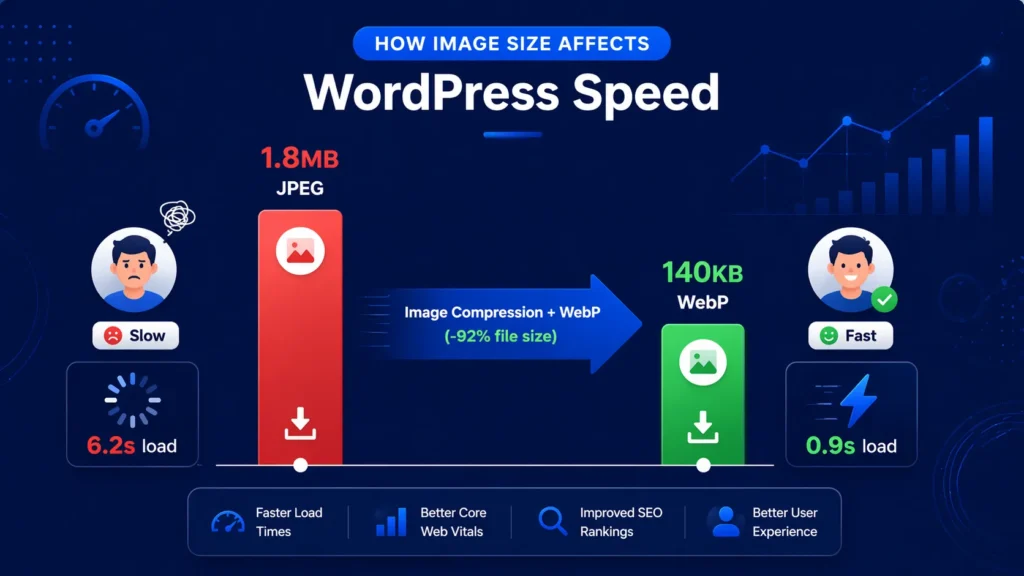
Image optimisation is the single easiest and most impactful speed improvement available to most WordPress websites. How website image sizes affect page speed is direct and proportional — a smaller image downloads faster, and faster downloads produce faster LCP scores.
Step-by-Step WordPress Image Optimisation
- Install ShortPixel or Imagify — these plugins automatically compress and convert all your images to WebP format on upload.
- Bulk optimise your existing media library — both plugins allow you to process all historical images in one operation.
- Set maximum image dimensions — most WordPress websites never need images wider than 1920px. Configure your media settings to enforce this maximum.
- Enable lazy loading — add loading=’lazy’ to all below-fold images. WordPress does this by default since version 5.5, but verify your theme is not overriding it.
- Preload your LCP image — add a <link rel=’preload’> tag in your theme’s header for your hero image or the main above-fold image on key pages.
- Use the correct image format — WebP for photographs, SVG for logos and icons, PNG for images that need transparency.
Target Image File Sizes
- Hero / banner images: Under 150KB in WebP format
- Blog post featured images: Under 100KB in WebP
- Product images: Under 80KB per image in WebP
- Thumbnails: Under 20KB
- Logos: Under 10KB in SVG or WebP
Strategy 3: Implement Caching
Caching is the process of storing a pre-built version of your web pages so they can be served instantly to subsequent visitors without WordPress rebuilding them from scratch each time. Without caching, every page visit triggers database queries, PHP execution, and full page generation — a process that takes hundreds of milliseconds on even a good server.
Types of WordPress Caching
- Page caching: Stores complete HTML pages so they can be served without PHP processing. This is the most impactful cache type for most WordPress websites.
- Object caching: Caches database query results so repeated queries do not hit the database each time. Requires Redis or Memcached support from your hosting provider.
- Browser caching: Instructs visitors’ browsers to store static files (images, CSS, JS) locally so returning visitors load pages faster.
- Opcode caching: Server-level caching of compiled PHP code. Enabled by your hosting provider — ask if PHP OPcache is active.
Recommended Caching Plugin
WP Rocket is the most comprehensive and user-friendly WordPress caching solution — it handles page caching, browser caching, GZIP compression, and several other speed optimisations in a single plugin with minimal configuration. LiteSpeed Cache is an excellent free alternative for websites on LiteSpeed servers. W3 Total Cache is powerful but requires significant configuration expertise.
Pro Tip — Cache Exclusions Matter
When setting up WordPress caching, always exclude: WooCommerce cart and checkout pages, user account pages, pages with personalised content, and pages that use geolocation-dependent content. Caching these pages causes users to see each other’s cart contents, account information, or incorrect pricing — a critical user experience and privacy issue. Most quality caching plugins handle WooCommerce exclusions automatically, but always verify.
Strategy 4: Use a Content Delivery Network (CDN)
A Content Delivery Network (CDN) is a network of servers distributed globally that stores copies of your website’s static files — images, CSS, JavaScript — and delivers them from the server closest to each visitor. Without a CDN, a visitor in Sharjah loading your website hosted in a European data centre experiences the latency of that physical distance on every file their browser needs to download.
How CDN Improves WordPress Speed
- Reduces latency by serving files from a geographically nearby server — can reduce static file delivery time by 50 to 80%
- Reduces load on your origin server — the CDN handles most file delivery requests
- Provides automatic GZIP or Brotli compression of text files — CSS, JavaScript, and HTML
- Offers DDoS protection and security benefits alongside the speed improvements
For WordPress websites targeting UAE audiences, Cloudflare (free tier available) is the most widely used CDN — it has data centres in Dubai, offering extremely low latency for regional visitors. Bunny CDN and KeyCDN are strong alternatives with competitive pricing for Middle East traffic.
The combination of CDN with a properly configured Search Console setup gives you clear visibility into speed improvements over time. Our google search console service dubai monitors your Core Web Vitals field data through Search Console — so you can see exactly how CDN implementation and other speed improvements translate into real ranking signals.
Strategy 5: Eliminate Render-Blocking JavaScript and CSS
Render-blocking resources are CSS and JavaScript files that the browser must download and process before it can display any page content to the user. Every render-blocking resource adds directly to your LCP time — and most WordPress websites have multiple render-blocking scripts.
How to Identify Render-Blocking Resources
Open PageSpeed Insights for your key pages. Look for the ‘Eliminate render-blocking resources’ opportunity — it lists every file causing the problem with the estimated time saving from fixing each one. Typically you will find: plugin CSS files loading globally, Google Fonts loading synchronously, jQuery and other JavaScript libraries, and theme CSS files.
Fixes for Render-Blocking Resources
- Defer JavaScript: Add the ‘defer’ attribute to all non-critical JavaScript. WP Rocket’s ‘Delay JavaScript Execution’ feature does this automatically — delaying third-party scripts until after the initial page render.
- Inline critical CSS: Extract the CSS needed for above-the-fold content and place it inline in the HTML <head>. This allows the browser to render the visible page content immediately without waiting for external CSS files.
- Remove or replace Google Fonts: Host web fonts locally rather than loading them from Google’s servers — eliminates a DNS lookup and allows browser caching.
- Use the Perfmatters plugin: Allows per-page control of which scripts and styles load on which pages — preventing plugin CSS and JS from loading on pages where that plugin is not used.
Strategy 6: Choose a Lightweight WordPress Theme
Your WordPress theme is the single code element that affects every page on your website — and many popular premium themes are fundamentally incompatible with fast load times. Themes built on Elementor, Divi, WPBakery, or Avada often load 400KB to 800KB of CSS and JavaScript before any of your actual content — making it nearly impossible to achieve good Core Web Vitals scores.
Performance-Focused WordPress Themes
- GeneratePress: Loads under 10KB of CSS with no JavaScript by default. One of the fastest WordPress themes available — used professionally for speed-critical websites.
- Kadence: Excellent balance of design flexibility and performance. Loads only the CSS needed for each page and supports block-based page building.
- Astra: Lightweight base theme with excellent compatibility with the WordPress block editor. Strong performance with minimal customisation.
- Blocksy: Modern block-based theme with conditional asset loading — scripts and styles only load on pages that need them.
Switching themes is a significant change that requires careful planning, testing, and on-page SEO review. Our technical seo service dubai manages theme migrations for WordPress websites — ensuring speed is optimised without disrupting your existing SEO, content, or design.
Strategy 7: Audit and Clean Up Your Plugin Stack
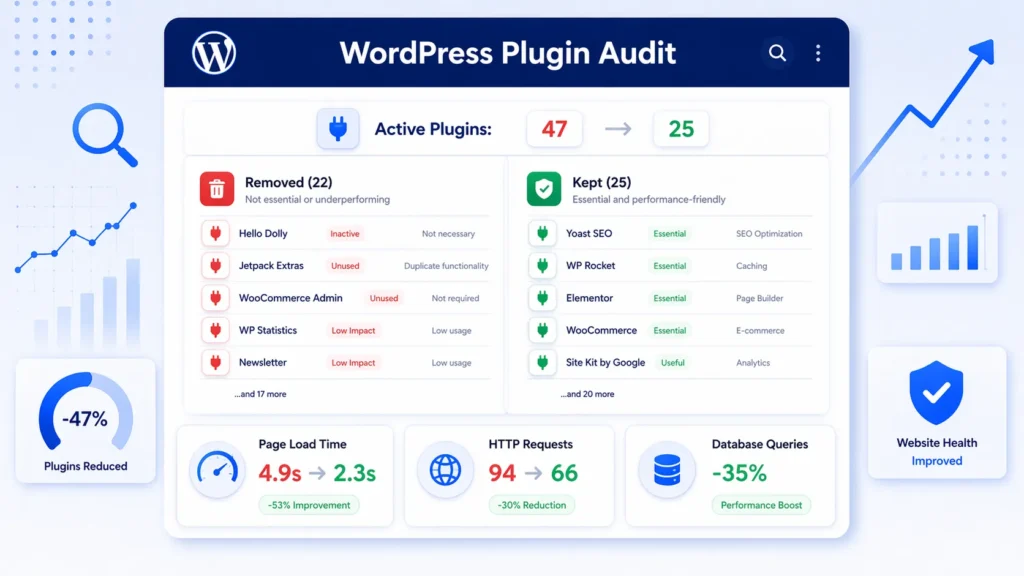
Every active WordPress plugin adds to your page load time — through PHP execution, database queries, and often additional CSS and JavaScript files. A WordPress website with 40 active plugins is almost always slower than an equivalent website with 15 well-chosen plugins performing the same functions.
Plugin Audit Process
- List all active plugins and the function each one serves.
- Identify plugins doing the same job — remove duplicates (e.g., two security plugins, two SEO plugins).
- Remove all deactivated plugins — they still occupy server storage and can cause conflicts.
- Use the Query Monitor plugin to identify which plugins are making the most database queries on page loads.
- Check the Perfmatters plugin’s ‘Script Manager’ to see which plugins are loading scripts on which pages.
- Replace heavy multi-function plugins with lighter single-function alternatives where possible.
High-Impact Plugins to Reconsider
- Contact form plugins with heavy JavaScript (replace with a lightweight alternative or Formspree)
- Slider plugins — virtually all carousel/slider plugins are performance liabilities with poor mobile UX
- Social sharing plugins that load external scripts from multiple social networks on every page
- Backup plugins running during business hours — schedule backups for low-traffic periods
- Outdated or abandoned plugins that have not been updated in over 12 months — these are also security risks
Strategy 8: Optimise Your WordPress Database
WordPress databases accumulate unnecessary data over time — post revisions, spam comments, transients, orphaned metadata, and deleted plugin data. This accumulated bloat increases the size of database queries and slows WordPress’s response time.
Database Optimisation Steps
- Install WP-Optimize or Advanced Database Cleaner — both automate database cleanup.
- Remove post revisions — WordPress saves a revision every time you edit content. Limit revisions to 3 to 5 per post by adding: define(‘WP_POST_REVISIONS’, 3) to wp-config.php.
- Clear spam and trash comments — these remain in the database even after deletion from the WordPress interface.
- Delete expired transients — temporary data stored by plugins that often accumulates without automatic cleanup.
- Run database optimise — WP-Optimize’s ‘Optimise Database’ function defragments database tables and reduces their size.
- Schedule automated weekly database cleanup — prevent re-accumulation of database bloat.
Strategy 9: Implement Correct Heading, Schema, and On-Page Structure
Website speed optimisation works in conjunction with on-page SEO — faster delivery of well-structured content produces compounding ranking benefits that neither speed nor content quality achieves independently.
Clean, properly structured on-page content with minimal render-blocking elements loads faster and ranks more effectively. Our on page seo service in dubai ensures your WordPress pages are fully optimised for both on-page ranking signals and lean, fast-loading delivery.
Schema markup — structured data that helps Google understand your content — should be implemented through lightweight JSON-LD code rather than plugin-generated markup that adds script overhead. Our schema markup service in dubai adds schema markup with minimal performance overhead — maximising rich result eligibility without adding to your page weight.
Strategy 10: Monitor Speed Continuously
Speed optimisation is not a one-time project. New plugins, theme updates, content changes, and hosting configuration changes can all introduce regressions. Establishing ongoing monitoring ensures speed improvements are maintained.
Speed Monitoring Setup
- Google Search Console Core Web Vitals report: Monitor monthly for any new pages entering the ‘Poor’ or ‘Needs Improvement’ categories.
- PageSpeed Insights monthly check: Test your 5 most important pages monthly — homepage, main service page, top blog post, contact page, and any page currently being ranked for a target keyword.
- Uptime monitoring: Use UptimeRobot (free) to monitor your website’s availability and response time — get alerted immediately if your site slows or goes down.
- New plugin pre-testing: Before installing any new plugin on a live website, test it on a staging environment and run PageSpeed Insights before and after to measure the impact.
WordPress Speed Optimisation for Specific Business Types
How to Improve Site Speed for Law Websites
Law firm WordPress websites typically have specific speed challenges: heavy stock photography on practice area pages, complex contact forms with validation JavaScript, Google Maps embeds, and multiple social proof widgets. Prioritise: compressing attorney and office photos, replacing slider-based hero sections with static images, and deferring all form validation scripts. Law websites convert better with faster load times — a potential client who bounces due to slow loading may hire a competitor instead.
Law firms targeting local Dubai clients benefit significantly from speed improvements combined with local SEO. Our local seo services dubai combines WordPress speed optimisation with local search signals — ensuring your law firm website is both fast and visible to potential clients searching locally.
Website Speed for Small Businesses
Website speed for small businesses is often neglected because most small business owners prioritise content and design over performance — especially on a budget. The good news is that the highest-impact speed improvements are also the most affordable: image compression (free with ShortPixel’s free tier), Cloudflare CDN (free tier available), and basic caching (LiteSpeed Cache is free). These three free optimisations alone typically reduce small business WordPress load times by 40 to 60%.
Small businesses can also benefit from speed improvements to their Google Business Profile and local listings — both of which are served by Google’s own infrastructure. For businesses wanting to maximise local visibility, our google my business seo services in dubai ensures your GBP is fully optimised to complement your fast-loading website.
How to Increase Website Speed for User Engagement
Increasing website speed for user engagement requires understanding that engagement metrics — time on page, pages per session, and scroll depth — all improve directly when load times improve. Users who wait for slow pages have already started mentally disengaging before the page finishes loading. A page that loads in 1.5 seconds starts the user engagement clock much earlier than one that loads in 4 seconds. Beyond the initial load, ensure subsequent page transitions within your WordPress site are also fast — this requires an optimised internal linking structure and ideally a prefetching solution like Flying Pages that pre-loads links in the background.
Expert Insight: WordPress Speed Optimisation in the UAE Market
Expert Insight — WordPress Speed for UAE Businesses
After optimising WordPress websites for hundreds of UAE businesses, two patterns stand out. First: the biggest speed gains consistently come from the simplest fix — hero image compression. The average Dubai business WordPress website has a hero image between 1.5MB and 3MB. Converting this single image to WebP at 150KB or below typically reduces LCP from 6 to 9 seconds down to 2 to 3 seconds in one step. This alone can move a website from failing Core Web Vitals to passing. Second: shared hosting is almost universal among small to medium UAE businesses — and almost universally inadequate for competitive search markets. The investment in upgrading from shared hosting to a VPS or managed WordPress host (often AED 100 to 200 per month difference) consistently produces ranking improvements that generate far more value than the hosting cost. The businesses that treat their hosting upgrade as a marketing investment — rather than a cost — recover the investment in new business within weeks in most cases.
Case Study: How Speeding Up a WordPress Website Tripled Organic Traffic
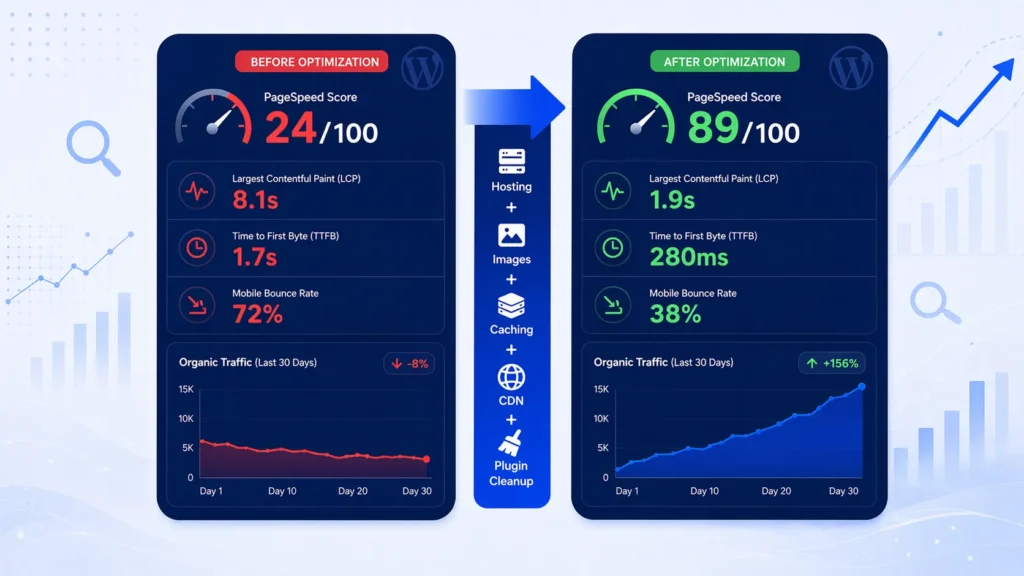
A Dubai-based professional services firm had a WordPress website built on Avada theme with 47 active plugins, uncompressed images averaging 1.2MB each, shared hosting with a TTFB of 1.7 seconds, and no caching or CDN. Their PageSpeed mobile score was 24 out of 100. Despite strong content and competitive keywords, they were ranking on page 2 to 3 for their primary service terms.
Here is the optimisation we performed over 5 weeks:
- Migrated hosting from shared to a VPS with Redis object caching — TTFB reduced from 1.7 seconds to 280ms.
- Installed WP Rocket — implemented page caching, browser caching, and JavaScript deferral.
- Compressed and converted all 340 images to WebP using ShortPixel — average image size reduced from 1.2MB to 87KB.
- Added Cloudflare CDN — reduced static file delivery time for UAE visitors by 62%.
- Switched from Avada theme to Kadence — eliminated 480KB of unused CSS and JavaScript that Avada loaded on every page.
- Removed 22 unnecessary plugins — reduced plugin count from 47 to 25.
- Added preload tag for the LCP hero image on all key service pages.
- Cleaned database of 12,000+ post revisions and expired transients.
Results after 8 weeks: PageSpeed mobile score rose from 24 to 89. LCP improved from 8.1 seconds to 1.9 seconds. All three Core Web Vitals metrics entered the Good range. Organic traffic grew by 312% within 12 weeks as Core Web Vitals field data updated and Google re-evaluated the website’s page experience signals. Three primary service keywords moved from page 2 to page 1. Revenue from organic search increased by AED 185,000 annually.
Related Guides
WordPress speed optimisation is most impactful as part of a complete technical SEO strategy:
- What Is Technical SEO — Understand how website speed fits into the complete framework of technical SEO.
- How Long Does SEO Take to Show Results? — Set realistic timelines for seeing ranking improvements after speed optimisation.
- What is SEO and How Does It Work — The complete beginner’s guide to SEO and where speed optimisation fits within it.
- How to Fix Crawl Errors in Google Search Console – illustrated dashboard showing 404 errors, redirect issues, and server errors being diagnosed and resolved.
- Core Web Vitals Optimization — Complete Guide Guide to Fix LCP, INP & CLS issues to boost rankings and user experience. Start improving today!
Frequently Asked Questions — How to Speed Up WordPress Website
What is a good website speed for WordPress?
A good website speed is a PageSpeed Insights score of 90 or above on both mobile and desktop, with an LCP (Largest Contentful Paint) under 2.5 seconds on mobile. For competitive Dubai markets, aim for LCP under 2 seconds and a mobile score above 90. Also target a TTFB (Time to First Byte) under 300ms — this is primarily determined by your hosting quality.
How do I check my WordPress website speed?
The most important tool is Google PageSpeed Insights (pagespeed.web.dev) — it shows both real user field data and laboratory scores with specific improvement recommendations. Also check your Core Web Vitals report in Google Search Console (Indexing → Core Web Vitals) for field data based on real user visits. Test both mobile and desktop — mobile almost always scores lower and is more important for rankings.
What affects website speed the most on WordPress?
In order of impact: hosting quality (TTFB — the biggest factor), image file sizes, caching configuration, plugin count and quality, theme code bloat, JavaScript loading order, and database optimisation. On most WordPress websites, fixing hosting plus image compression alone produces 60 to 70% of the total achievable speed improvement.
How web hosting affects WordPress website speed?
Your hosting determines your Time to First Byte (TTFB) — the time before your server delivers the first byte of your page to the browser. Shared hosting typically produces TTFB of 800ms to 2 seconds. VPS hosting produces 300 to 600ms. Managed WordPress hosting produces 100 to 300ms. Since TTFB adds directly to your LCP time, upgrading from shared to VPS or managed hosting is almost always the single highest-impact speed improvement available.
How do website image sizes affect page speed?
Images are typically 50 to 75% of total page weight — meaning they have the largest single impact on download time. An uncompressed 2MB hero image forces every visitor to download 2MB before your page looks complete. Converting that same image to WebP at 150KB reduces download time by over 90%. Multiplied across all images on a page, compression and format conversion typically reduce total page weight by 60 to 80%.
What are the best caching plugins for WordPress speed?
WP Rocket is the most comprehensive and user-friendly — it handles page caching, browser caching, GZIP compression, and JavaScript deferral with minimal configuration. LiteSpeed Cache is the best free option for websites on LiteSpeed servers. W3 Total Cache is powerful but requires significant technical expertise to configure correctly. Avoid using multiple caching plugins simultaneously — they conflict with each other and cause issues.
Does a CDN really improve WordPress speed in Dubai?
Yes significantly — particularly for image and static file delivery. Cloudflare’s CDN has data centres in Dubai, meaning static files (images, CSS, JavaScript) are served from milliseconds away rather than from a server in Europe or the US. For websites with visitors primarily in the UAE, CDN implementation typically reduces static file delivery time by 50 to 80% and meaningfully improves LCP scores.
How many WordPress plugins are too many?
There is no absolute number — a well-coded plugin that loads minimal resources has far less speed impact than a poorly coded plugin that loads multiple script files. However, as a practical guideline: most WordPress websites function well with 15 to 25 active plugins. Above 30, the probability of performance conflicts and unnecessary resource loading increases significantly. Conduct a plugin audit to ensure every active plugin is earning its resource cost.
How does website speed affect SEO rankings?
Website speed affects SEO through two mechanisms: (1) Direct ranking signals — Core Web Vitals (LCP, INP, CLS) are confirmed Google ranking factors. Websites meeting Good thresholds receive a positive page experience signal. (2) Indirect user behaviour signals — slow pages have higher bounce rates, lower time on page, and fewer pages per session. Google interprets these engagement signals as quality indicators. The combined effect of direct and indirect speed signals makes page speed one of the most impactful technical SEO improvements available.
What is TTFB and why does it matter for WordPress speed?
TTFB (Time to First Byte) is the time between a browser requesting a page and receiving the first byte of data from the server. It measures server response speed. A good TTFB is under 300ms. High TTFB (above 800ms) adds directly to your LCP time and is almost always caused by inadequate hosting — shared hosting, slow database queries, or no server-level caching. No amount of front-end optimisation can fully compensate for a fundamentally slow server response.
Can I speed up WordPress without a developer?
Yes — most high-impact WordPress speed optimisations can be implemented by a non-developer using plugins. Image compression (ShortPixel or Imagify), caching (WP Rocket), and CDN (Cloudflare) all have user-friendly dashboards that require no code. Hosting upgrade involves managing your hosting account but no coding. The optimisations that typically require developer involvement are: theme switching, render-blocking CSS inlining, server configuration changes, and complex JavaScript optimisation.
How long does it take to speed up a WordPress website?
The core speed optimisations — image compression, caching setup, CDN configuration, and plugin cleanup — can typically be completed in 4 to 8 hours of work for an experienced technician. The ranking impact from speed improvements then takes 28 to 60 days to fully materialise, as Google’s field data (which uses a 28-day rolling window) needs to update to reflect the improved real-user experience.
Do page builders like Elementor and Divi slow down WordPress?
Significantly yes. Page builders like Elementor, Divi, WPBakery, and Avada load substantial CSS and JavaScript on every page — regardless of whether that page uses any builder features. Elementor typically adds 300 to 500KB of assets per page. This is a fundamental architectural limitation, not a configuration issue. For websites where passing Core Web Vitals is a priority, switching to a block-based theme built around the native WordPress editor is often the most impactful long-term solution.
What is a WordPress speed optimisation service?
A WordPress website speed optimisation service is a professional service that diagnoses your specific performance issues and implements all necessary fixes — hosting review, image optimisation, caching configuration, CDN setup, code optimisation, and ongoing monitoring. Our technical seo service dubai includes comprehensive WordPress speed optimisation as part of every technical SEO engagement.
How does website speed affect conversion rates for Dubai businesses?
Research from Google shows that every 1-second improvement in mobile load time increases conversion rates by up to 27%. For Dubai businesses with competitive average order values — real estate enquiries, legal consultations, medical appointments — this translates directly to measurable revenue increase from the same traffic volume. A professional seo agency dubai treats speed optimisation as both a ranking strategy and a conversion optimisation strategy — maximising the value of every visitor your website receives.
Conclusion: Start Speeding Up Your WordPress Website Today
Understanding how to speed up WordPress website performance is one of the highest-ROI technical investments any Dubai business can make. The evidence is clear: faster websites rank higher, convert better, and retain more visitors. The businesses that treat website speed as a permanent performance standard — not a one-time project — build a compounding advantage over competitors who address it reactively.
Start with the highest-impact items: compress your images to WebP today, install a caching plugin this week, and assess whether your hosting is the bottleneck. These three actions alone can produce dramatic speed improvements and are achievable without developer expertise.
For more complex optimisations — hosting migration, theme switching, render-blocking resource elimination, and ongoing Core Web Vitals monitoring — professional guidance ensures the work is done correctly without disrupting your existing SEO and content investments.Need expert help speeding up your WordPress website and improving your search rankings? Our technical seo service dubai delivers comprehensive WordPress speed optimisation — from initial audit through to full implementation and ongoing monitoring. Get your free speed audit today and discover exactly what is holding your website back.




1 Comment
Technical SEO Audit Checklist: Step-by-Step Guide
April 24, 2026 at 3:26 pm[…] WordPress sites specifically, our how to speed up WordPress website guide provides platform-specific optimizations that can dramatically reduce load […]