


If your website isn’t ranking despite great content, the problem is likely technical. A technical SEO audit checklist is the systematic process of diagnosing every technical issue that prevents search engines from crawling, indexing, and ranking your site. Studies show that over 65% of websites have crawlability issues that silently suppress rankings. This guide gives you a complete, step-by-step framework — from crawl analysis to Core Web Vitals — to fix those issues and reclaim your traffic.
| Key Takeaways A technical SEO audit checklist is the foundation of any successful SEO strategy. Crawlability, indexation, Core Web Vitals, HTTPS, structured data, and mobile usability are the six pillars of technical SEO. Regular audits (every 3–6 months) catch issues before they damage rankings. Both WordPress and eCommerce sites have unique audit requirements beyond standard checklists. Local businesses need a dedicated local SEO audit checklist that includes Google Business Profile and NAP consistency. |
What Is a Technical SEO Audit?
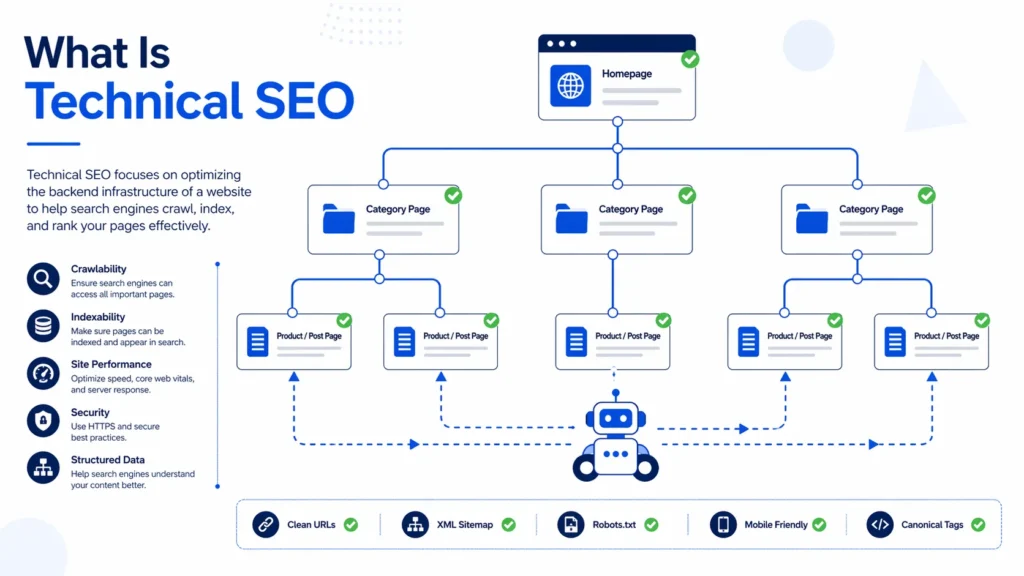
A technical SEO audit is a structured evaluation of a website’s backend and infrastructure to identify issues that affect how search engines crawl, index, and rank it. It covers site speed, mobile usability, HTTPS, URL structure, internal linking, duplicate content, and more. To learn the full picture of what this discipline involves, read our in-depth resource on what is technical SEO before diving into this checklist.
Unlike content or link audits, a technical SEO audit focuses purely on the engineering layer of your website — the foundation that everything else is built on. Without it, even the best content and strongest backlinks will underperform.
Why Every Website Needs a Technical SEO Audit Checklist
Search engines like Google send automated bots to crawl every page on your site. If those bots encounter errors, slow load times, broken redirects, or confusing signals, your rankings suffer. A practical technical SEO audit checklist gives you a repeatable system to prevent this from happening. According to Google Search Central, crawling and indexing are entirely separate processes — a page can be crawled but not indexed, meaning it never appears in search results.
Here’s why audits matter for your bottom line:
- Lost rankings: Undetected crawl errors can cause Google to skip key pages entirely.
- Wasted crawl budget: Large sites with thousands of pages may have Google spending crawl budget on low-value URLs instead of important ones.
- Poor user experience: Slow pages and broken links hurt both rankings and conversions.
- Penalty risk: Duplicate content or insecure pages can trigger algorithmic penalties.
Pro Tip: Run a technical SEO audit every 3–6 months — and immediately after any major website redesign, platform migration, or significant content update.
Types of Technical SEO Audits: Comparison Table
Not all audits are the same. Your audit scope depends on your website type and business goals. Here’s a quick breakdown:
| Audit Type | Best For | Key Focus Areas | Frequency |
| Standard Technical | All websites | Crawl, index, speed, HTTPS | Every 3–6 months |
| WordPress Technical | WP sites | Plugin bloat, theme conflicts, WP-specific SEO | Every 3 months |
| eCommerce SEO | Online stores | Faceted nav, duplicate SKUs, product schema | Monthly |
| Local SEO Audit | Local businesses | GMB, NAP, local citations, local schema | Monthly |
If you run an online store, an eCommerce SEO audit checklist will have unique considerations like faceted navigation, product duplicate content, and pagination. For brick-and-mortar businesses, a local SEO audit checklist focusing on Google Business Profile and local citations is equally critical.
The Complete Technical SEO Audit Checklist: Step by Step
This is the full technical SEO audit checklist you need to conduct a thorough analysis of any website. Follow each step in order for best results.
Step 1: Crawl Your Website
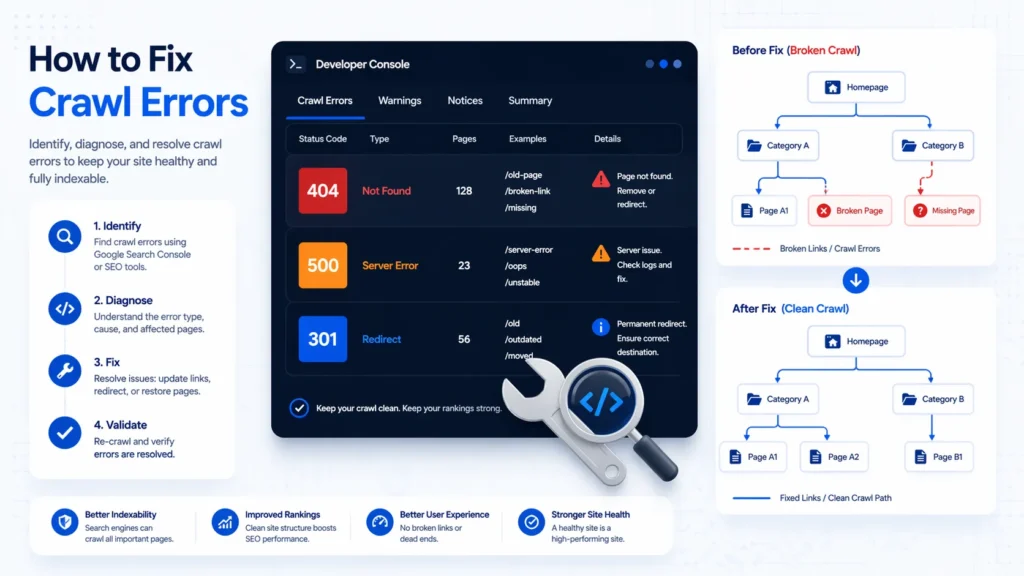
The first step in any SEO audit technical analysis checklist is a full site crawl. Use tools like Screaming Frog, Sitebulb, or Ahrefs Site Audit to map every URL on your site.
- Configure your crawler to respect your robots.txt but also run a test with it disabled to see what’s being blocked.
- Set the crawl to follow JavaScript rendering (important for React/Angular/Vue sites).
- Check for crawl traps such as infinite scroll, calendar pages, or session ID parameters.
- Export the crawl report and group URLs by status code: 200 (OK), 3xx (redirects), 4xx (errors), 5xx (server errors). If you’re seeing a large number of errors, our guide on how to fix crawl errors walks you through every type and its solution.
Step 2: Check Indexation Status
Indexation tells you which pages Google has actually saved in its database. Just because a page is live doesn’t mean it’s indexed.
- Use the site: operator in Google (site:yourdomain.com) to get a rough count of indexed pages.
- Open Google Search Console service Dubai — or your GSC account — and navigate to Coverage > Indexed to see exact numbers.
- Identify pages marked as ‘Discovered – currently not indexed’ or ‘Crawled – currently not indexed’ — these are priority fixes.
- Review your XML sitemap. All priority pages should be listed there. Learn more about getting your pages discovered in our guide on how to submit sitemap to Google.
- For a deeper dive into resolving these problems, see our resource on fix indexing issues Google Search Console.
Step 3: Audit Your Robots.txt File
Your robots.txt file instructs search engine bots on which pages to crawl and which to ignore. A misconfigured robots.txt can accidentally block your entire site from Google. Understanding what is robots.txt SEO is essential before making any changes.
- Ensure your robots.txt is accessible at yourdomain.com/robots.txt.
- Check it does not disallow crawling of key pages like product pages, category pages, or blog posts.
- Confirm your sitemap URL is referenced at the bottom of the robots.txt file.
- Test all disallow rules in the Google Search Console URL Inspection tool.
Step 4: Check HTTPS and Site Security
Security is a confirmed Google ranking factor. Every page on your site must be served over HTTPS with a valid SSL certificate.
- Verify your SSL certificate is valid and not expiring within 30 days.
- Check for mixed content issues (HTTP assets loaded on HTTPS pages) using browser dev tools.
- Confirm all HTTP URLs permanently redirect (301) to their HTTPS equivalents.
- Ensure www and non-www versions redirect to one canonical version.
Step 5: Evaluate Site Speed and Core Web Vitals
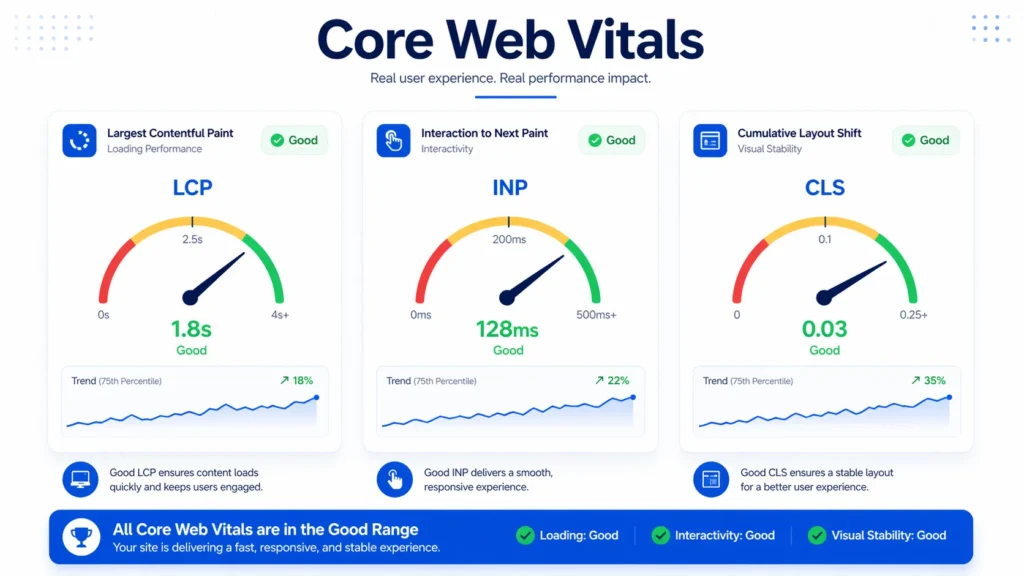
Google’s Core Web Vitals are official ranking signals measuring real-world user experience. Our full Core Web Vitals optimization guide covers every metric in detail, but here’s what to check at audit stage:
- LCP (Largest Contentful Paint): Should be under 2.5 seconds. Optimize images, use CDN, and improve server response time.
- FID / INP (Interaction to Next Paint): Should be under 200ms. Reduce JavaScript execution time.
- CLS (Cumulative Layout Shift): Should be below 0.1. Set explicit dimensions for images and embeds.
Pro Tip: Use Google PageSpeed Insights AND the Core Web Vitals report in Search Console together. PageSpeed shows lab data; Search Console shows real-user (field) data — both matter.
For WordPress sites specifically, our how to speed up WordPress website guide provides platform-specific optimizations that can dramatically reduce load times.
Step 6: Identify and Fix Broken Links (404 Errors)
Broken internal and external links damage user experience and waste crawl budget. They’re among the most common issues found in any SEO audit.
- Use your crawl tool to export all URLs returning 404 status codes.
- Prioritize 404s that have inbound links from other websites (check in Ahrefs or Search Console).
- Redirect broken URLs to the most relevant existing page using 301 redirects. Our how to fix 404 errors guide covers both manual and plugin-based solutions.
- Review external links pointing to your site that land on 404 pages and reclaim that link equity.
Step 7: Audit URL Structure and Canonicalization
Duplicate content and poorly structured URLs are common issues that confuse search engines and split link equity.
- Ensure URLs are short, descriptive, and use hyphens (not underscores) between words.
- Check that every page has a canonical tag pointing to the preferred version of that URL.
- Identify duplicate content using crawl data — look for parameter-based duplicates, printer-friendly versions, and tag/archive pages.
- Confirm trailing slash consistency (use /page/ or /page — not both).
Step 8: Check Mobile Usability
With Google using mobile-first indexing for all new websites, mobile usability is not optional. Issues here directly suppress rankings.
- Use Google’s Mobile-Friendly Test tool to check each key page.
- Check for tap targets that are too small (buttons and links should be at least 48×48 CSS pixels).
- Ensure text is readable without pinch-zooming (16px+ font size recommended).
- Verify that pop-ups and interstitials do not cover main content on mobile — Google penalizes intrusive interstitials.
Step 9: Structured Data and Schema Markup
Schema markup helps Google understand your content and can earn rich results (stars, prices, FAQs) in search listings. Businesses that implement schema markup report up to 30% higher click-through rates from search results. Partnering with a qualified schema markup service in Dubai can help you implement the right schema types for your business at scale.
- Check existing structured data using Google’s Rich Results Test.
- Add appropriate schema types: Article, Product, LocalBusiness, FAQ, BreadcrumbList, Organization.
- Fix any schema errors or warnings flagged in the Rich Results Test.
- Validate JSON-LD implementation — it’s the format preferred by Google.
Step 10: Audit Internal Linking Structure
Internal links distribute PageRank across your site and help search engines understand your content hierarchy. A weak internal linking structure can leave important pages ‘orphaned’ — invisible to crawlers.
- Identify orphan pages (pages with no internal links pointing to them) using your crawl tool.
- Ensure your most important pages (money pages) receive the most internal links.
- Fix broken internal links discovered in Step 6.
- Use descriptive, keyword-rich anchor text naturally. For example, pages benefitting from structured on page seo service in dubai should be internally linked from relevant, topically related content.
WordPress Technical SEO Audit Checklist
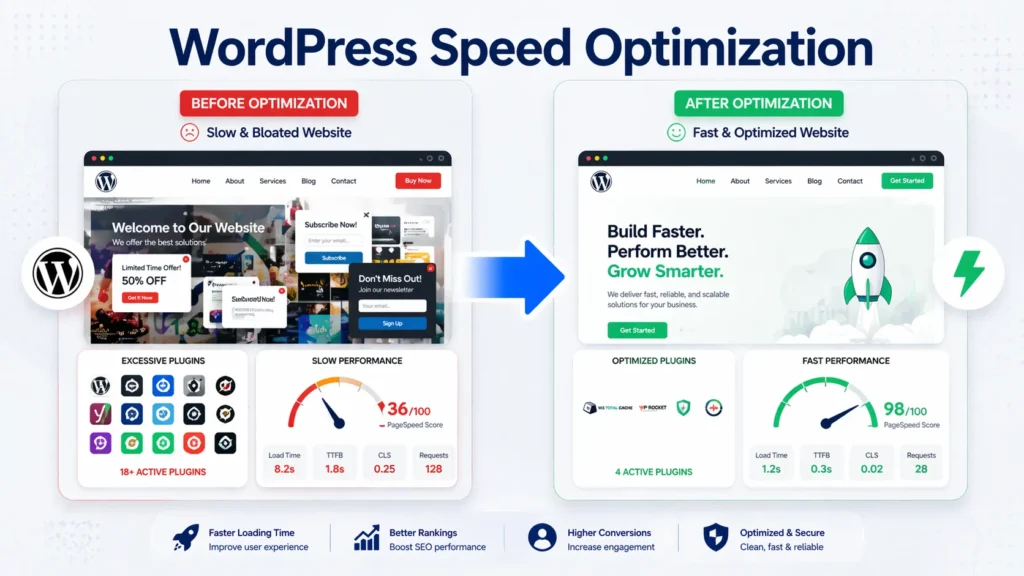
WordPress powers over 43% of all websites, but it introduces unique technical challenges. This WordPress technical SEO audit checklist addresses the platform-specific issues most commonly found during WordPress audits.
- Plugin conflicts: Deactivate plugins one by one to identify which ones cause slowdowns or SEO conflicts.
- Yoast/Rank Math settings: Verify your SEO plugin’s sitemap, canonical, and meta robot settings are configured correctly.
- Theme quality: Bloated themes with excessive CSS/JS can cripple page speed. Run a speed test with and without your theme active.
- WordPress core updates: Running outdated WordPress versions introduces both security vulnerabilities and compatibility issues.
- Attachment pages: WordPress creates individual pages for every uploaded image. These should be redirected to their parent post or noindexed.
- Pagination: Category and tag archives create near-duplicate content. Use rel=canonical or noindex on archive pages beyond page 2.
eCommerce SEO Audit Checklist
An eCommerce SEO audit checklist requires special attention to product pages, category structures, and site architecture. For online stores, technical errors at scale can have a massive revenue impact.
- Faceted navigation: Filters (size, color, price) generate thousands of duplicate URLs. Use canonical tags or parameter handling in Search Console to control this.
- Product schema: Implement Product schema with price, availability, and review ratings for rich snippet eligibility.
- Thin product pages: Product pages with minimal content are treated as low-quality. Add unique descriptions, specs, and user reviews.
- Out-of-stock pages: Keep them live with a 200 status code, add schema showing ‘OutOfStock’, and link to alternatives.
- Pagination and infinite scroll: Use proper pagination markup (rel=next/prev or paginated canonical) so crawlers index all product listings.
- International/multilingual: Implement hreflang tags correctly for stores serving multiple countries or languages.
Local SEO Audit Checklist
For businesses serving a specific geographic area, a local SEO audit checklist is a critical supplement to standard technical audits. As a leading seo agency dubai, we consistently find that local businesses leave significant ranking potential untapped due to neglected local signals.
- Google Business Profile (GBP): Claim, verify, and fully optimize your GBP listing with accurate NAP, business hours, categories, photos, and services.
- NAP consistency: Your Name, Address, and Phone number must be identical across your website, GBP, and all citations.
- Local citations: Audit your business listings on directories like Yelp, Yellow Pages, TripAdvisor, and industry-specific directories for accuracy.
- Local schema: Implement LocalBusiness schema on your homepage and contact page with accurate NAP details.
- Reviews: Monitor and respond to Google reviews. Review quantity and quality are local ranking signals.
Our specialized local seo services dubai team handles all aspects of local optimization, from citation building to GBP management. We also offer dedicated google my business seo services in dubai for businesses that need expert-level GBP optimization.
Case Study: What a Full Audit Uncovered
A mid-sized Dubai-based retail eCommerce client approached us for a technical audit after experiencing a 40% traffic drop following a website redesign. Here’s what we found:
- 10,000+ duplicate URLs generated by faceted navigation — none had canonical tags.
- Homepage blocked in robots.txt — the developer had left a ‘Disallow: /’ rule active from the staging environment.
- SSL mixed content errors on 230 product pages — images were still loading over HTTP.
- LCP of 8.7 seconds on mobile — caused by uncompressed hero images and render-blocking scripts.
- Zero structured data across 4,000 product pages — missing rich result eligibility entirely.
After completing a full technical SEO audit and implementing all fixes over six weeks, the site recovered 85% of its lost traffic within 90 days and achieved rich results for 1,200 products within four months.
Expert Insight
After 10+ years of conducting technical SEO audits, I’ve learned that the most damaging issues are almost never the obvious ones — they’re the quiet killers: accidental noindex tags on product pages, canonical tags pointing to the wrong URL, or a robots.txt rule left over from a staging migration. Always assume there’s something wrong until your audit proves otherwise.
When to Hire a Professional for Your Technical SEO Audit
DIY audits work well for understanding your site’s health, but executing fixes — especially at scale — requires specialized expertise. A dedicated technical seo service dubai team brings both diagnostic accuracy and implementation speed that in-house teams often cannot match. Consider professional help when:
- Your site has over 500 pages and complex URL structures.
- You’ve experienced a significant traffic drop after a Google algorithm update.
- You’re planning a platform migration (e.g., Magento to Shopify, or a full redesign).
- You’ve run audits but seen no improvement after implementing fixes.
Businesses looking for a comprehensive seo audit dubai service will benefit from professional analysis that covers technical issues alongside content gaps and off-site factors. Pairing technical fixes with strong off page seo services in dubai creates a compound effect that accelerates ranking recovery.
Frequently Asked Questions (FAQ)
What is included in a technical SEO audit checklist?
A complete technical SEO audit checklist covers crawlability, indexation, HTTPS security, page speed, Core Web Vitals, mobile usability, URL structure, canonical tags, structured data, XML sitemaps, robots.txt, and internal linking. The exact scope varies by website type (WordPress, eCommerce, local, etc.).
How long does a technical SEO audit take?
For a small website (under 100 pages), a technical audit takes 1–3 days. For large sites (1,000+ pages), a thorough audit can take 1–3 weeks depending on complexity and available tools.
What tools do I need for a technical SEO audit?
The essential tools are: Screaming Frog or Sitebulb (crawl analysis), Google Search Console (indexation and Core Web Vitals), Google PageSpeed Insights (performance), Ahrefs or Semrush (backlinks and broken links), and Google’s Rich Results Test (structured data).
How often should I run a technical SEO audit?
Most websites benefit from a full technical audit every 3–6 months. High-traffic or frequently updated sites — particularly eCommerce — should audit monthly. Always run an audit after a major redesign, platform migration, or significant algorithm update.
What is the difference between a technical SEO audit and an on-page SEO audit?
A technical SEO audit examines the infrastructure and backend of a website — crawlability, server configuration, page speed, and structured data. An on-page audit focuses on content quality, keyword optimization, meta tags, and heading structure. Both are necessary for comprehensive SEO.
Can I download a technical SEO audit checklist as a PDF?
Yes. Many SEO agencies and tools like Ahrefs, Moz, and Semrush offer downloadable SEO audit checklist PDFs. However, for a customized PDF checklist tailored to your industry or platform, working with an SEO professional will give you more targeted results.
What are the most common technical SEO issues?
The most common issues found during a technical SEO audit include: missing or incorrect canonical tags, slow page load times, broken internal and external links, missing XML sitemaps, pages blocked by robots.txt, missing HTTPS redirects, duplicate content from URL parameters, and poor mobile usability.
Is Core Web Vitals part of a technical SEO audit?
Yes. Core Web Vitals — LCP, FID/INP, and CLS — are official Google ranking factors and a key part of any modern technical SEO audit checklist. They measure real-world user experience signals and are tracked directly in Google Search Console.
What is a WordPress technical SEO audit checklist?
A WordPress technical SEO audit checklist includes all standard technical checks plus WordPress-specific items: plugin conflicts, SEO plugin settings (Yoast/Rank Math), attachment page redirects, theme performance, WordPress core and plugin update status, and archive page optimization.
What makes an eCommerce SEO audit different?
An eCommerce SEO audit checklist must address faceted navigation and parameter-based duplicate URLs, product schema markup, out-of-stock page management, thin product page content, pagination handling, and international/multilingual hreflang implementation — none of which typically apply to informational websites.
Does technical SEO affect local rankings?
Yes. Page speed, mobile usability, HTTPS, and structured data all influence local rankings. A local SEO audit checklist adds GBP optimization, NAP consistency, local citation accuracy, and LocalBusiness schema to the standard technical checklist.
What is crawl budget and why does it matter?
Crawl budget is the number of pages Google will crawl on your site within a given time frame. Large sites with thousands of pages need to optimize crawl budget by blocking low-value URLs (via robots.txt or noindex), improving site speed, and reducing redirect chains — so Google uses its crawl allocation on important pages.
How do I know if my site has indexation problems?
Signs of indexation problems include: fewer pages indexed in Google than you expect (check via site:yourdomain.com), pages showing as ‘Discovered – currently not indexed’ in Search Console, or organic traffic drops with no corresponding ranking changes.
What is canonical tag and why is it important in a technical audit?
A canonical tag tells search engines which version of a URL is the ‘original’ when duplicate or near-duplicate content exists. In a technical SEO audit, canonical tags must be checked for self-referencing canonicals, cross-domain canonicals, and incorrect canonicals pointing to wrong pages.
Should I audit my site if I use a website builder (Wix, Squarespace, Shopify)?
Yes. Website builders limit some technical controls, but you can still audit and optimize page speed, mobile usability, image compression, meta tags, structured data, and internal linking. For Shopify specifically, faceted navigation and duplicate product URLs are common technical SEO challenges worth auditing.
Conclusion: Make the Technical SEO Audit Checklist Your Competitive Advantage
A thorough technical SEO audit checklist is not a one-time task — it’s a recurring discipline that separates high-performing websites from those that plateau. From crawl analysis and indexation checks to Core Web Vitals optimization and schema implementation, every step in this guide addresses a real ranking barrier that could be limiting your visibility right now.
Whether you’re running a WordPress blog, a multi-thousand-product eCommerce store, or a local service business in Dubai, the principles of a solid technical SEO audit checklist remain the same: find what’s broken, fix it systematically, and monitor for regression.
If you’re ready to go beyond the checklist and want a full professional audit delivered by an experienced team, explore our technical seo service to see how we can identify and resolve every technical barrier standing between your website and the rankings it deserves.